

Every time a customer pays by card, you pay too. Most of the time you never see it happen. The processor takes its cut before the money lands, and the sale simply arrives a little smaller than the order said.
For a big retailer that is a rounding error. For a small store on thin margins it is real money: often the difference between a product that pays its way and one that does not. The good news is that you get to decide who carries that cost. Build it into your prices, pass it on as a clear line at checkout, or reward customers who pay a cheaper way. WP EasyCart lets you do any of the three, and do it properly.
Small fee. Big leak.
Card fees feel small because they are quoted small. A rate such as 2.9% plus 30 cents sounds like nothing. But it comes off your revenue, not your profit, so it bites much harder than it looks:
- It eats margin, not sales. If you keep 20% of a sale as profit, a 3% card fee takes about one seventh of it.
- It grows with every order. More sales means more fees. A busy holiday season brings a bigger processing bill with it.
- It is charged on everything. Your processor takes its percentage on the full amount it charges: the products, the shipping and the tax. You only earn on the products.
That last point is the one most stores miss, and it is where most fee setups go wrong. More on that below.
Absorb it. Price it. Or pass it on.
There is no single right answer. There are three honest ones:
- Build it into your prices. The simplest option. Nudge prices up a little and nobody sees a fee at all. Best when most of your customers pay by card anyway.
- Add a card fee at checkout. A clear line such as “Card processing fee” when the shopper picks card. Common in trade, B2B and high-value orders, where buyers expect it.
- Reward the cheaper way to pay. A small discount for bank transfer or invoice payment. Same result for your margin, and it feels like a perk, not a penalty.
WP EasyCart handles the second and third with Flex-Fees, part of WP EasyCart PRO. A Flex-Fee adds its own line to the order at checkout: a charge, or, with a negative amount, a discount. It sits alongside the rest of payments in WP EasyCart.
One window. One sentence.
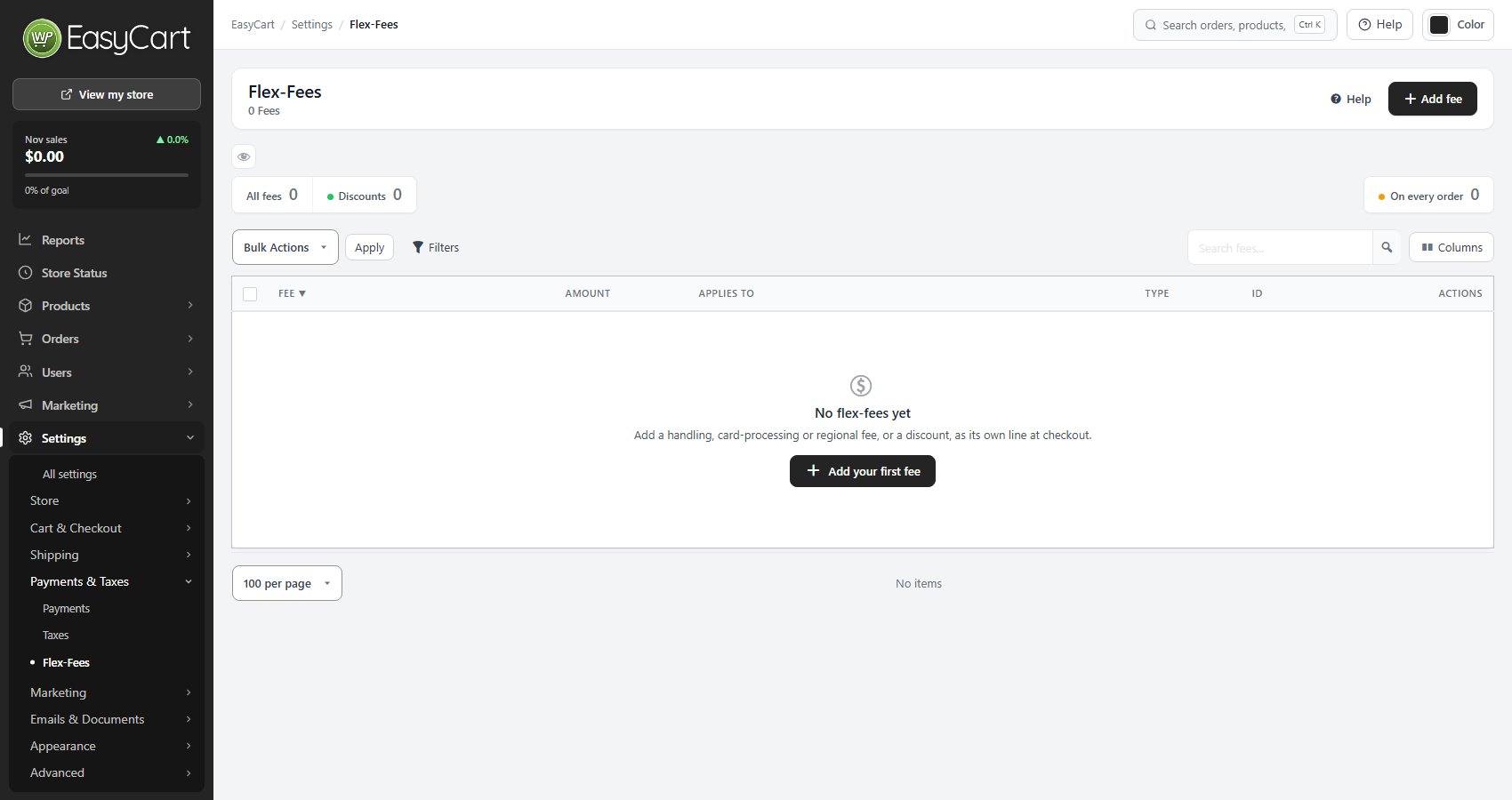
Go to EasyCart › Settings › Payments & Taxes › Flex-Fees and press Add fee. The New flex-fee window opens with a row of ideas across the top. Pick Card processing fee and it fills itself in: 2.9% of the order total, on card payments only. Change any of it to match your own processor’s rate.
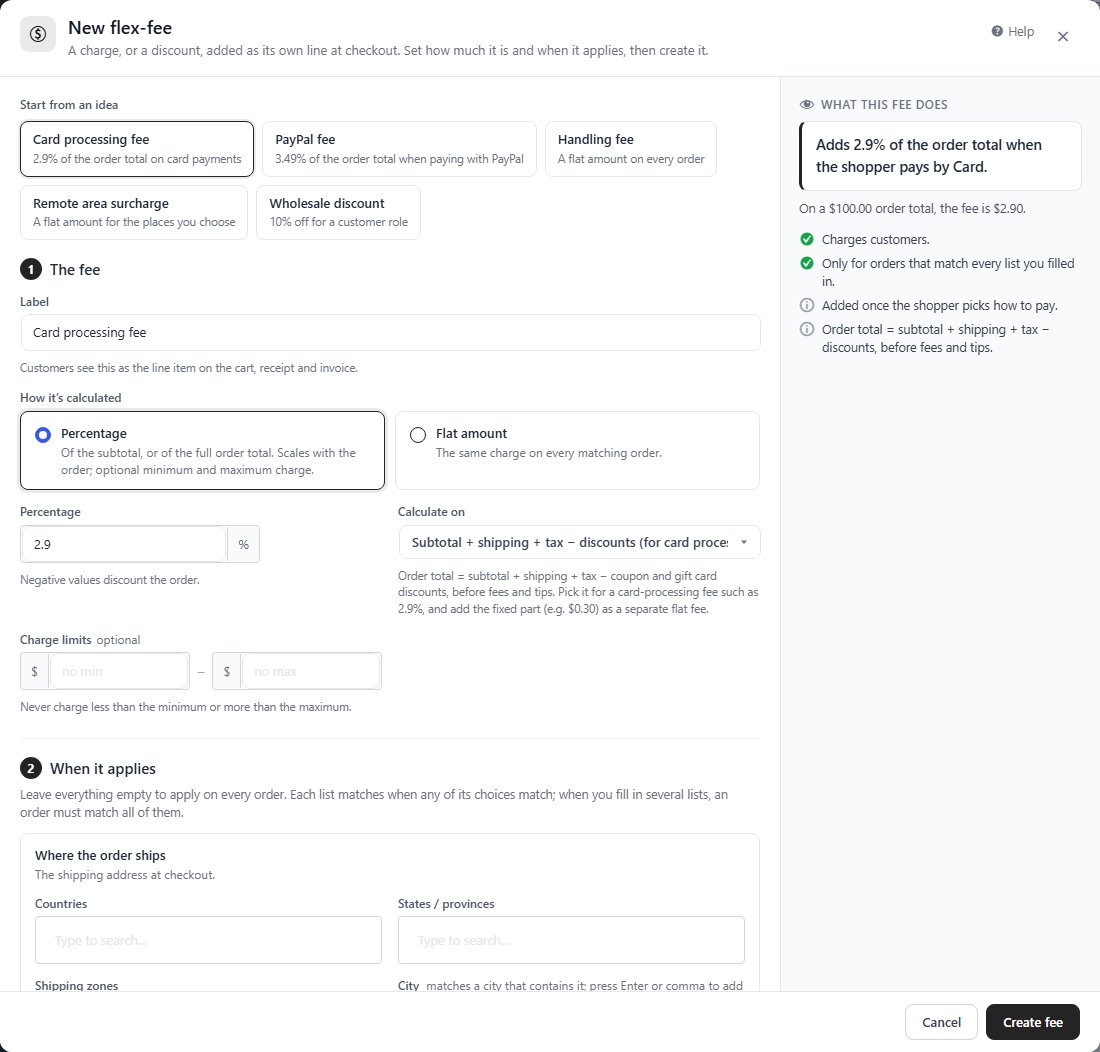
Beside the fields, What this fee does says it in plain words: “Adds 2.9% of the order total when the shopper pays by Card.” It works the fee out on a sample $100 order, and warns you about mistakes, such as a zero amount or a minimum above the maximum, before you press Create fee. Nothing is saved until you do.
The fields themselves are short:
- Label. What customers see on the cart, the receipt and the invoice. Write it as something a buyer understands, such as “Card processing fee”.
- How it’s calculated. Percentage, or a Flat amount that is the same on every matching order.
- Charge limits. An optional smallest and largest charge, so a big order never carries a shocking fee.
Cover the whole order.
Here is the detail that matters most. A percentage fee has a Calculate on setting. The default is Subtotal, the products only. The other choice is Subtotal + shipping + tax − discounts: the order total after coupons and gift cards, before fees and tips.
Why does it matter? Take a $100 basket with $15 shipping and $8 tax. Your processor charges its percentage on all $123. A 2.9% fee worked out on the subtotal collects $2.90. The processor takes about $3.57. You pay the difference on every single order. Work the fee out on the order total and it matches what you are actually charged.
2.9% plus 30 cents?
Many processors charge a percentage and a fixed amount. Make the percentage one fee calculated on the order total, then add the fixed part as a second, flat fee limited to the same way to pay. The customer sees one card fee line per fee, and your cost is covered.
Only when it makes sense.
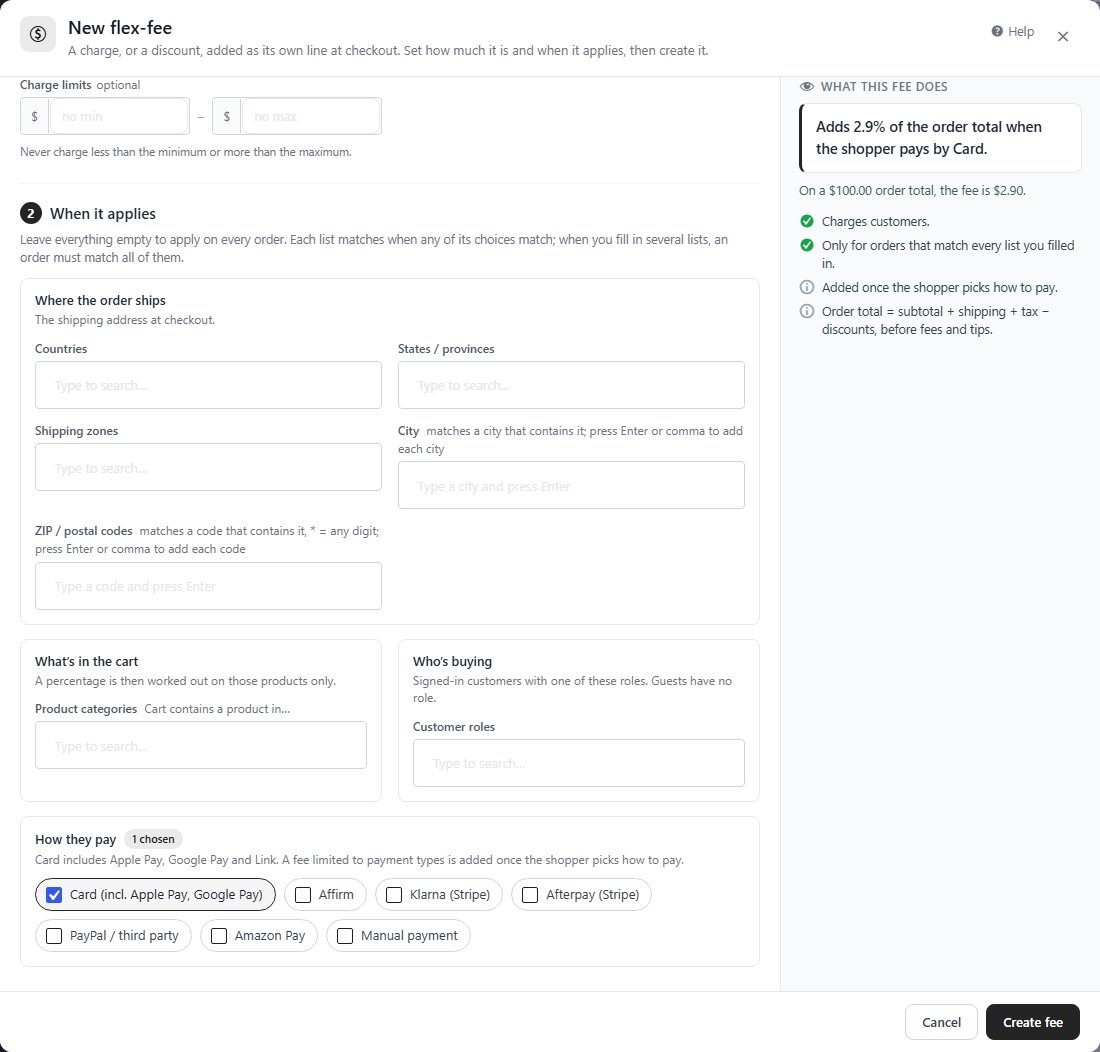
Leave When it applies empty and the fee lands on every order. That is rarely what you want for a card fee. Fill in one or more of four lists instead:
- How they pay. Card, Affirm, Klarna, Afterpay, PayPal / third party, Amazon Pay or Manual payment. Card covers Apple Pay, Google Pay and Link too, since they are card payments underneath. A fee limited this way is added once the shopper picks how to pay, so nobody pays a card fee for a bank transfer.
- Where the order ships. Countries, states or provinces, shipping zones, cities or ZIP and postal codes. Handy for a remote area surcharge, or for leaving out a place where surcharges are not allowed.
- What’s in the cart. Product categories. A percentage is then worked out on those products only.
- Who’s buying. Customer roles, for signed-in customers. Exempt your trade accounts, or give them their own terms.
Each list matches when any of its choices match. Fill in several and an order must match all of them. The same fees follow your invoices and phone orders: a customer paying from a pay link sees the fee for the way they choose to pay, before they pay.
Fair on the way back.
A fee you charge is a fee you may have to give back. When you refund part of an order, a percentage fee is prorated to the amount refunded, and a flat fee is refunded all or nothing. The refund window shows the items, shipping, fees and tax separately, so you can see exactly what goes back. Fees also appear in your reports and exports, so you always know what they brought in.
And if a surcharge does not suit your store, turn it around. Give a Flex-Fee a negative amount and it becomes a discount. Set How they pay to Manual payment and you have a small reward for paying by bank transfer, which costs you far less than a card. The same trick, limited to a customer role, makes a standing wholesale discount.
Check your own plan, too.
While you are looking at fees, look at ours. On the free WP EasyCart plan, payments through Stripe, Square or PayPal connected with WP EasyCart carry a 2% WP EasyCart fee, on top of your processor’s own fees. WP EasyCart PRO and Premium have no WP EasyCart fee at all.
Once a store sells about $496 a month through those gateways, that 2% costs more than a year of PRO. So for most growing stores, upgrading cuts a fee and unlocks Flex-Fees in the same step. The plans and prices are on the pricing page.
Before you switch it on.
- Check the rules. Card surcharges are restricted or banned in some places, and card networks have their own rules on top. Flex-Fees will apply a surcharge; it cannot tell you whether you are allowed to. Check before you turn one on, and consider a cheaper-way-to-pay discount where you cannot.
- No surprises at the last step. A charge that first appears at checkout costs sales. Mention it on your payment or FAQ page, and in your product pages if you sell mostly to trade.
- Know your real rate. Look at last month’s processor statement and divide the fees by the amount charged. Set your fee to that, not to a guess.
- Shop your processor. A lower rate helps every order. WP EasyCart PRO adds 30+ more payment gateways, so you are not stuck with one.
- Review it each quarter. Rates change. Check that your fee still matches what you pay.
The full field-by-field guide is in Flex-Fee Settings. Stuck? Open a request in your account and tell us the fee and an order number.
★★★★★ Rated 4.5 out of 5 by 200+ store owners on wordpress.org
“Includes literally everything you need to get your online store and payment gateways setup in such a nice and easy to follow package.”
— jyching1, wordpress.org review, March 2021
WP EasyCart PRO
Keep more of every sale.
Flex-Fees, 30+ more payment gateways and no WP EasyCart fee are all part of WP EasyCart PRO, from $119 a year or $14.99 a month, renewing with AutoPay and cancellable any time ( see the plans ). Start a free trial and set up your card fee this week.