

Every autumn the carriers do the same thing. From early October to the middle of January, USPS, UPS and FedEx add a holiday surcharge to almost every parcel they carry. It is a few cents on a light package going a short way, and several dollars on a heavy one crossing the country. Your customers never see it. You pay it, on every order, for fifteen weeks.
For a small store, those are the busiest fifteen weeks of the year. If your rates were set in the spring, each order now earns a little less than you think, right when you sell the most. The fix is one honest look at your numbers, then twenty minutes in WP EasyCart’s shipping settings.
Surcharges. Every parcel. Every week.
Here is the season as the carriers have announced it:
- USPS adds its peak surcharge from 4 October 2026 to 17 January 2027 on Priority Mail, Priority Mail Express, Ground Advantage and Parcel Select. It is one flat window: the same extra amount from the first day to the last, set by the parcel’s weight and how far it travels.
- UPS started charging extra for large and awkward packages on 27 September. Its per-package surcharges on Air, Ground Residential and Ground Saver begin on 25 October, rise again from late November to Boxing Day, and end on 16 January 2027.
- FedEx follows the same pattern: handling and oversize fees from 28 September, demand surcharges from 26 October, a higher “peak of peak” from 23 November to 27 December, and an end on 17 January 2027.
On a USPS commercial label the extra runs from about 40 cents on a light parcel nearby to about nine dollars on a heavy Priority Mail box crossing the country, with more on Express. No one surcharge is large. It just lands on every order, in the season when you ship the most.
Do the sum for your own store
Multiply last December’s order count by the surcharge on your usual parcel. At 300 parcels a month and a dollar each, that is close to a thousand dollars by January.
Why rates drift. Quietly.
Most stores set their shipping rates once, on launch day. Carriers change their prices at least twice a year: a general increase every January and the holiday surcharge every autumn. Two years on, a “standard shipping” rate that once covered the label is a discount you did not mean to give. Three habits make it worse:
- One flat rate for everything. The light orders subsidise the heavy ones, until the heavy ones are the ones that sell at Christmas.
- Products with no weight or size. A weight table or a live carrier quote cannot price a product it knows nothing about.
- A free-shipping threshold set years ago. If your average order has grown past it, you are giving free shipping on orders you would have got anyway.
The plugin is where you fix all three. Everything below lives in EasyCart › Settings › Shipping. Rate tables, handling fee, free-shipping threshold, zones and box sizes are in the free edition. Live carrier rates and Offers are PRO.
Know your numbers first.
Before you touch a setting, price three orders at the counter or in your label software, to an address a few states away: your smallest typical order, your average order and your heaviest. Then open EasyCart › Reports and note your average order value. Every decision below comes back to those four numbers.
Fix one: raise the table.
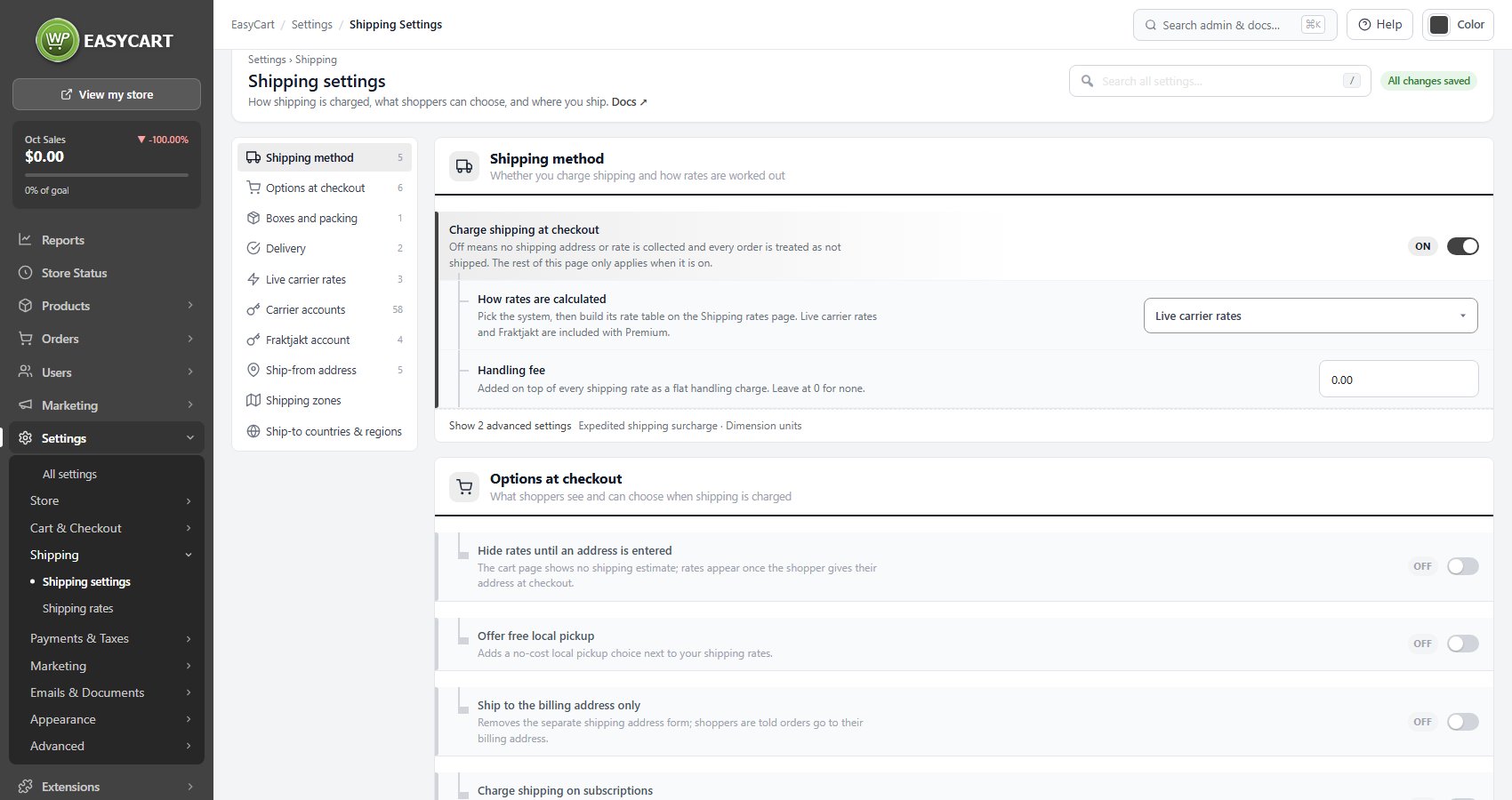
Go to EasyCart › Settings › Shipping settings. The Shipping method card asks whether you Charge shipping at checkout and How rates are calculated: flat rates the shopper picks from, a table by order total, weight or number of items, a percentage of the order total, or live carrier rates. Only the method you pick is used, but every table is kept.
The quickest fix of all is right under it. Handling fee is a flat amount added on top of every shipping rate. Set it to your typical surcharge today and remove it in January, and you have covered the season without editing a single row.
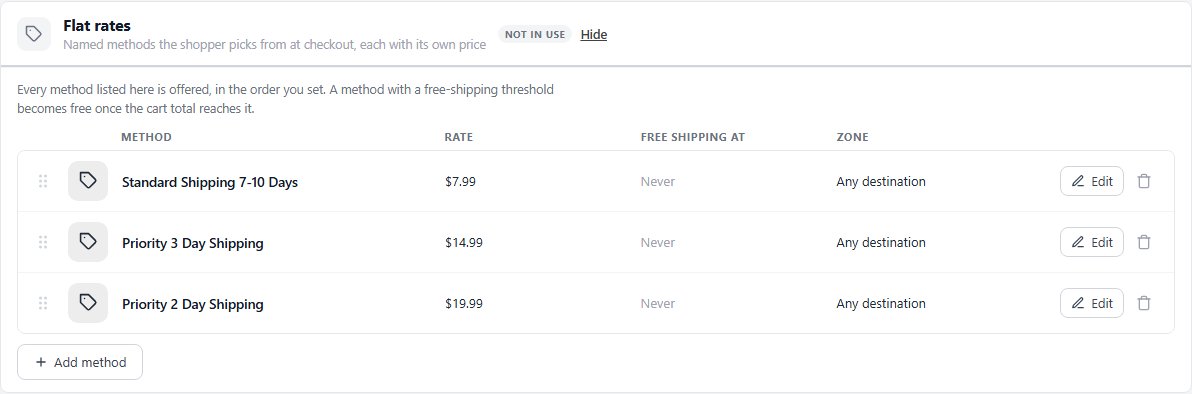
For a proper repricing, open EasyCart › Settings › Shipping rates:
- Flat rates. Press Add method or Edit on a row, then set the Method name shoppers see, the Rate and the Zone. Give heavy, far-away orders their own method instead of one rate for everything.
- By order total, weight or quantity. Each row starts at a value, Cart total from, Order weight from or Items in the cart from, and has a rate. Keep one row starting at 0 so the smallest order still gets a price. Weight tiers are the honest way to charge, because that is how the carriers charge you.
- Zones. The Shipping zones card groups countries and regions, and every rate row can be limited to one zone, so local and international orders stop sharing one number.
Match the tiers to the three numbers you wrote down. If your heaviest order costs three times your smallest to ship, the table should say so. Every option is in the Shipping Rates reference.
Fix two: free shipping that pays for itself.
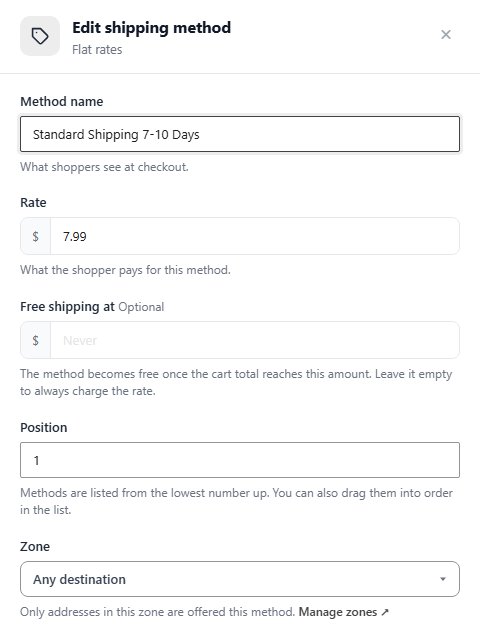
Free shipping is the best-selling offer in ecommerce and the easiest way to lose money in December. The rule: the threshold goes above your average order value, so the customer has to add something to earn it. If your average order is 48 and free shipping starts at 40, you are paying the surcharge on orders that needed no help.
- On a flat-rate method, set Free shipping at. The method stays listed and becomes free once the cart total reaches that amount. Free.
- On a by-order-total table, add a row starting at your threshold with a rate of 0. Free.
- With Offers (PRO), create a Free Shipping Over… offer in EasyCart › Marketing › Offers. It has a start and an end date, so you can run a higher threshold for the surcharge season and let it switch back on its own in January. Since 6.0.2 a free-shipping offer comes straight off live carrier rates too.
Whichever you use, raise the threshold for the season by about what the surcharge adds to your typical parcel, and say why on the cart page. Shoppers understand holiday shipping. More on Offers.
Fix three: let the carrier quote.
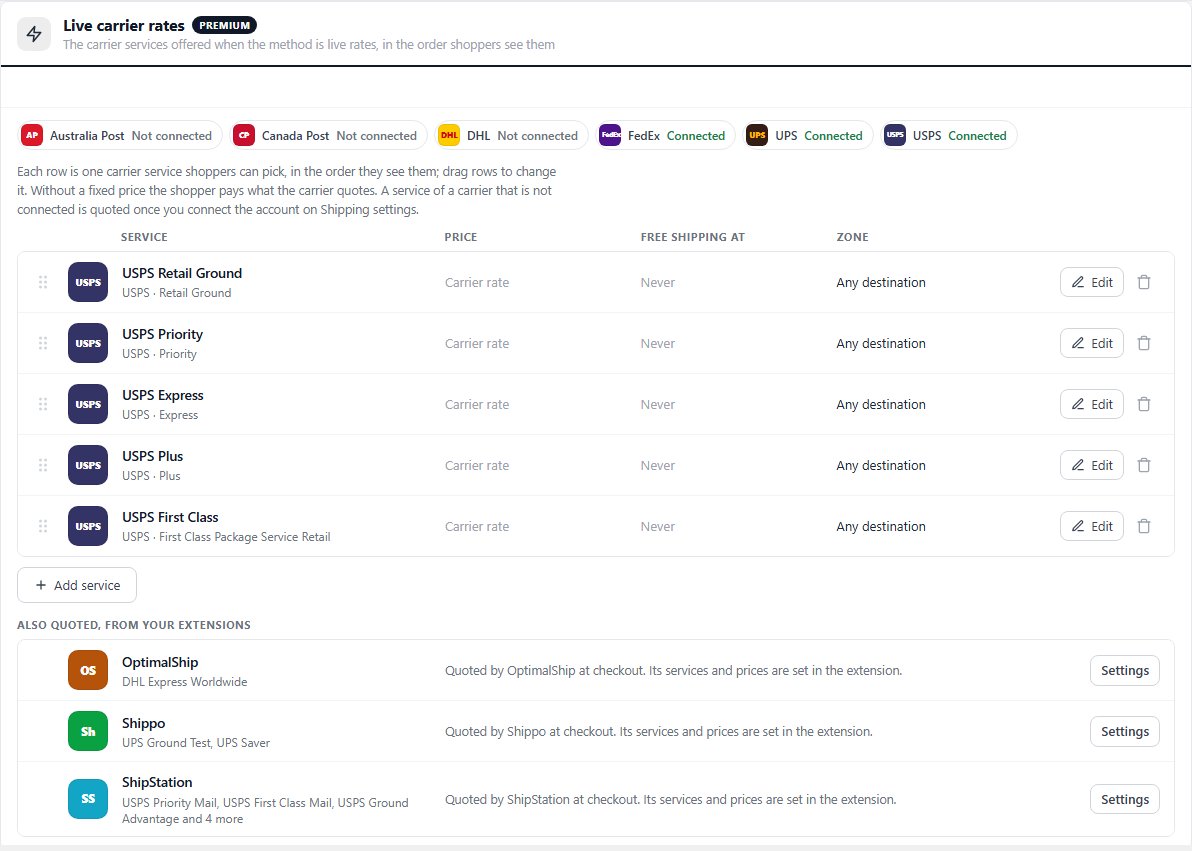
The one setup that never drifts is the one where the carrier prices every order itself. With Live carrier rates as your method, the cart, weight and address go to the carrier at checkout and the real price comes back. When the carrier’s prices change, your checkout changes with them, surcharge season included. Live rates are PRO, and the free trial unlocks them on your own store.
WP EasyCart quotes USPS, UPS, FedEx, DHL, Canada Post and Australia Post from your own carrier accounts, and UK stores get Royal Mail postage from Royal Mail’s price lists. Set it up like this:
- On Shipping settings, set How rates are calculated to Live carrier rates.
- Open Carrier accounts. Each carrier has its own tab and an on switch, such as Enable USPS, with the origin details it needs. The connection status updates as soon as you save and names anything still missing.
- On Shipping rates, open Live carrier rates and press Add service. Offer a few clearly different services, say Ground, Priority and Express. Fewer, clearer choices convert better.
- Back on Shipping settings, turn on Show estimated delivery days in the Live carrier rates card. It answers “will it arrive in time?” before the customer asks.
Version 6.0 made live rates far more dependable. The carriers are asked at the same time, every request has a time limit, a carrier that is down is skipped for five minutes instead of stalling the cart, and a quote is reused for up to thirty minutes while the cart is unchanged. Parcels are measured correctly, so USPS, UPS, FedEx and DHL quotes are much closer to the real cost, and a cart that ships in several boxes is quoted as several boxes rather than one big carton.
You can still protect a rate you have promised: give a service a fixed price and the shopper pays that instead of the carrier quote. See how live rates compare with the extension route, or follow the USPS setup, screen by screen.
Right box. Right weight. Right quote.
A rate is only as good as the weight behind it. Every physical product needs its packed weight, width, height and length in the Package fields of the product editor’s Shipping section. The section’s summary says no weight yet when one is missing.
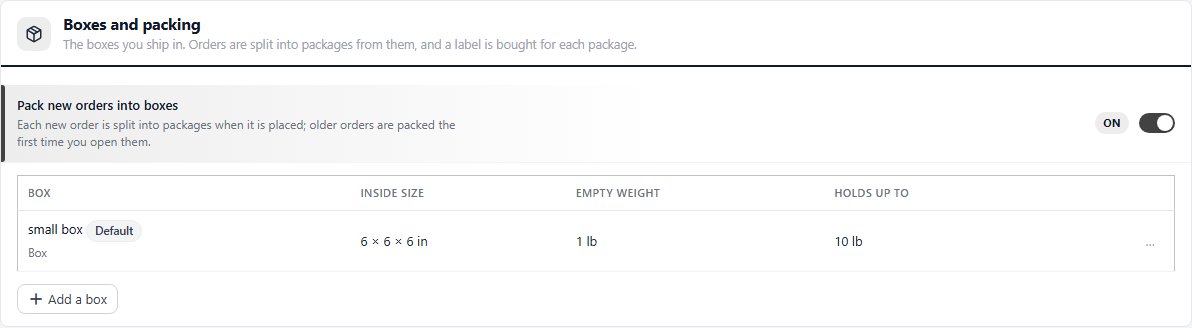
Then tell the store what you ship in. The Boxes and packing card holds each box with its inside size, empty weight and what it holds, with one as the default. With Pack new orders into boxes on, each order is split into packages when it is placed, so a multi-box order is quoted and labelled as the boxes it really ships in. The box weighs something, and the carriers charge for it. Now your store does too. Free in every edition.
Test it like a shopper.
- Put your smallest order in the cart and check the shipping on the cart page. If Hide rates until an address is entered is on, go through to checkout.
- Repeat with your average order and your heaviest, to a home address a few states away.
- Try a cart just under and just over your free-shipping threshold, and one address in each zone.
- Place one real test order and check the shipping amount on it in EasyCart › Orders.
Compare each result with your numbers. If a rate still comes in under your cost, you know which row to change. The full checklist is in Set Up Shipping That Does Not Lose Money.
Beyond the settings screen.
- Pay commercial prices. Buying labels through Shippo, ShipStation or Stamps.com, all Premium extensions, usually costs less than the counter price, and the surcharge is smaller on commercial labels too.
- Shrink the box. Carriers price by size as well as weight. One box size down often saves more than the surcharge adds.
- Publish an order-by date. A clear “order by 18 December for Christmas delivery” line cuts the rush shipping you end up paying for yourself.
- Put January in the diary. The surcharges end in mid-January and the carriers’ annual increases arrive at the same time. Review the table and the threshold again then, and take the Handling fee off.
- Watch the orders. Once a week, compare what a few customers paid for shipping with what the labels cost. Ten minutes catches a drift before it becomes a season.
Stuck on a carrier connection or a table that will not price an order? Open a request in your account and name the order that priced wrong.
★★★★★ Rated 4.5 out of 5 by 200+ store owners on wordpress.org
“This one does it all. Haven’t found a thing we couldn’t easily get done, displayed the way we wanted.”
— tasmaniandevil, wordpress.org review, April 2021
WordPress ecommerce
Rates that cover the season.
Rate tables, zones, a handling fee, free-shipping thresholds and box sizes are free in WP EasyCart. Live USPS, UPS and FedEx rates and seasonal free-shipping offers are PRO. Start a free trial and try them on your own store before the rush.