

Orders do not wait for you to get back to your desk. They land while you are at a market stall, on the school run, at a trade show or finally taking a day off. Until now, checking one meant opening a laptop and signing in to WordPress.
Not any more. The new WP EasyCart app is out today for iPhone and Android. One app, rebuilt from the ground up with the same fresh look as WP EasyCart 6.0, and it puts every order from every store you run right in your pocket.
Small team. Big reach.
Most small stores are run by one or two people who also do everything else. Speed is the edge you have over the big retailers: the reply that comes in ten minutes, the order that ships the same day, the problem fixed before the customer has to ask twice.
That speed is hard to keep when the store only lives on a laptop. A tracking number waits until evening. A customer question sits unanswered over lunch. A rush order is missed because nobody saw it come in. None of it is a big failure. It is just friction, and friction costs repeat sales.
A store manager in your pocket removes it. You see the order, you deal with it, you get on with your day. That is what the WP EasyCart app is for.
Every order. At a glance.
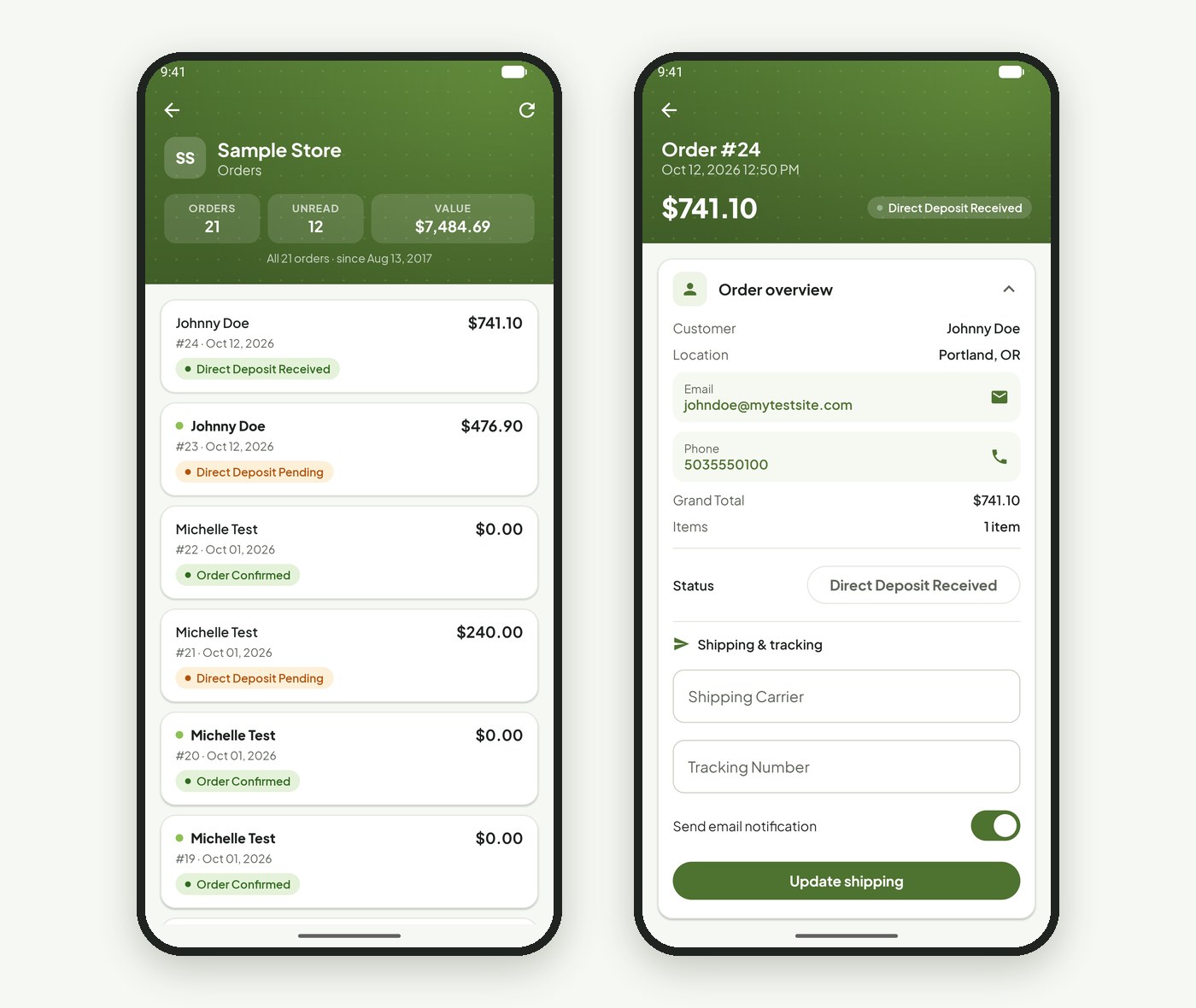
Open a store and the newest orders are at the top. Every row shows the customer, the order number, the date, the total and the status, and orders you have not opened yet are marked as unread. Across the top, quick stats show the store’s orders, unread count and total value. Pull down to refresh.
Tap an order to see everything about it: the customer, where they are, what they bought and what they paid. It is the same order you see in WordPress, just shaped for a phone.
Ship it. Tell them. Done.
Seeing orders is useful. Acting on them is the point. From any order you can:
- Change the status. Mark it paid, processing, shipped or any status your store uses.
- Add tracking and tell the customer. Enter the carrier and tracking number, and the customer gets their tracking email in the same step.
- Fix the order. Edit line items, quantities, prices, totals, discounts, tax and shipping.
- Update addresses. Change the billing or shipping address when a customer moves or makes a typo.
- Leave a note. Add order notes so the rest of the team knows what happened.
- Reach the customer. Tap to email or call them straight from the order.
Refunds stay in your WordPress admin, where you have the full payment details in front of you. Everything else on the order side goes with you. See how to fulfill orders for the full workflow.
Turn on the shipped email
Adding tracking from the app and leaving the email switch on is the quickest way to cut “where’s my order?” messages. Customers who get a tracking link rarely need to ask.
New order? You'll know.
Switch on new order alerts for a store and your phone tells you the moment an order is placed, on Android and iPhone alike. Turn them on for the store you watch closely and off for the one you check once a day. Each store has its own switch.
For a busy week, like a launch, a sale or the run-up to the holidays, it means you can step away from the screen without wondering what you are missing.
Every store. One app.
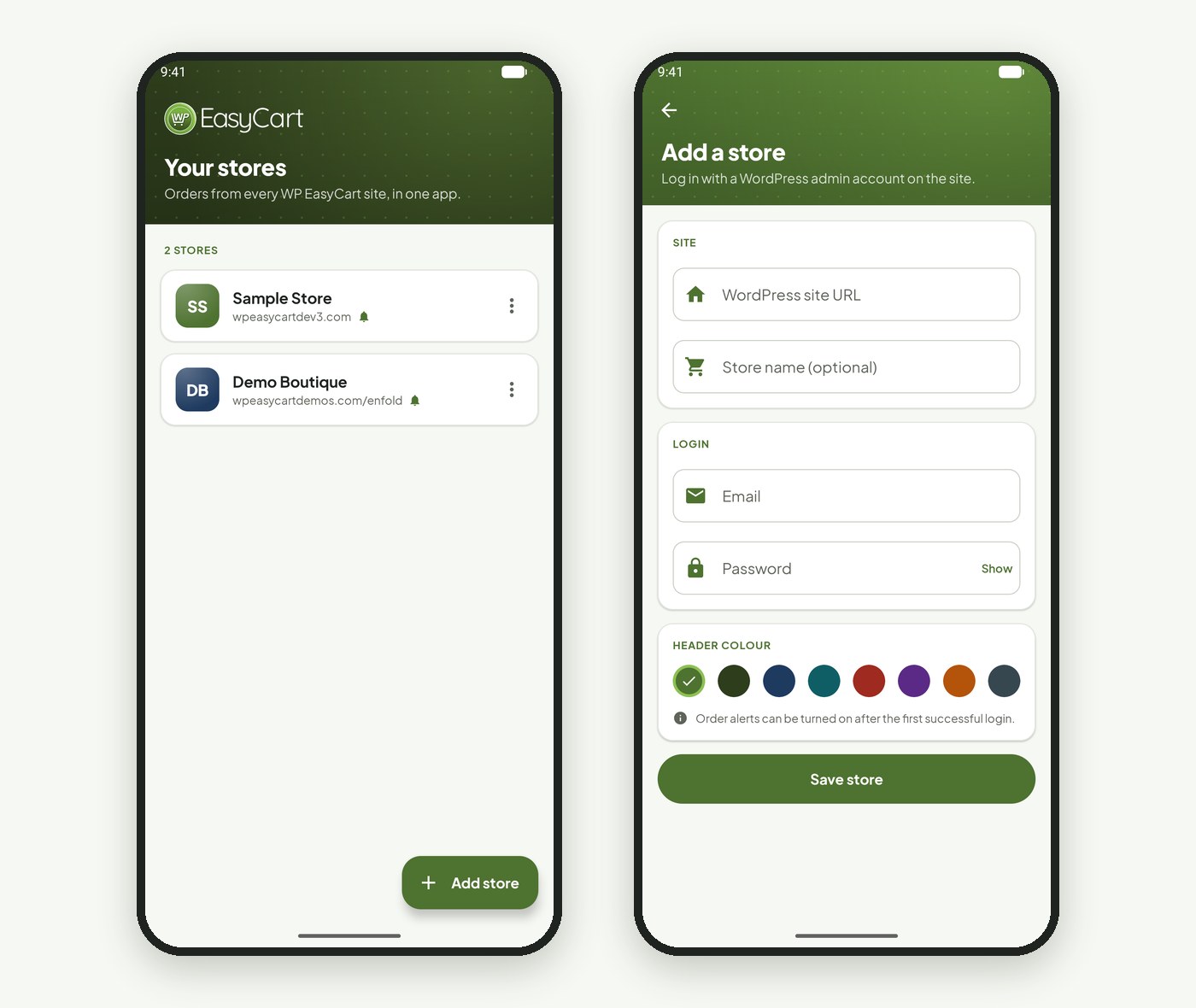
Run more than one shop? Or look after stores for clients? Add every WP EasyCart store you manage and switch between them in a tap. Each store gets its own color, so you always know which one you are in, and each keeps its own login, stored securely on your phone.
Built for real days.
Here is where store owners tell us an app on the phone matters most:
- Markets and pop-ups. Sell at the stall, and still see the web orders coming in behind you. Note who wants to collect, and reply to the customer who asked about stock.
- Trade shows and travel. A week away no longer means a week of backlog. Keep orders moving and customers informed from the hotel or the airport.
- The shop floor. If you have a physical shop too, check a web order without leaving the counter.
- Agencies and freelancers. Look after several client stores and answer “did my order come through?” in seconds, with each store in its own color.
- Evenings and weekends. Glance at the day’s orders from the sofa, then put the phone down. No laptop required.
And when there is a bigger job, like a refund, a new product or a settings change, your full WordPress admin is right where you left it.
Three steps. Five minutes.
- Add Premium to your store. The app connects to your WordPress site through WP EasyCart Premium, so it needs to be installed and licensed first.
- Download the app. Get it from Google Play on Android 8.0 or later, or the App Store on iPhone with iOS 16 or later. It is free to download.
- Add your store. Enter your site address and your WordPress admin login. Add more stores the same way.
Upgrading from the old iPhone app? This is a brand-new app, so add your stores once and you are set. The phone apps guide walks through every screen, and the mobile apps page has the full feature list.
Good habits. Happy customers.
The app makes you faster. These habits make the speed count:
- Answer within the hour. A quick reply to a question about an order wins more loyalty than any discount. Tap to email, right from the order.
- Ship and track the same day. Add tracking as you drop the parcel off, not when you get home.
- Use statuses your customers understand. Clear statuses make the order page in My Account answer questions for you.
- Keep alerts where they help. Alerts on for the stores you run day to day; off for the quiet ones, so the important ping still stands out.
- Use one admin login per person. If staff use the app too, give each person their own WordPress login, so order notes show who did what.
Questions about the app? Our team is available through your account.
★★★★★ Rated 4.5 out of 5 by 200+ store owners on wordpress.org
“We have been using WPEasy Cart since 2018 on our website design/builds and recommend this plugin to all of our ecommerce clients.”
— Tina Marker, wordpress.org review, August 2024
New for iPhone and Android
Your store, in your pocket.
The WP EasyCart app is free to download and connects through WP EasyCart Premium. Not on Premium yet? Start a free trial and try the app on your own store.