

Black Friday is the one week a year when shoppers come looking for you. They have a list, a budget and a dozen tabs open. A good offer turns that attention into new customers, bigger orders and a list of people who will buy again in January.
A careless offer does the opposite. A code meant for your newsletter ends up on a coupon site. One customer uses it five times. Two discounts stack and an order ships below cost. The sale “worked”, the orders poured in, and the margin went out with them. The fix is not a smaller sale. It is a better-built one, and WP EasyCart’s Offers give you every control you need to build it.
Big sale. Small leaks.
Discounts rarely fail in one dramatic moment. They leak, one small gap at a time:
- Codes travel. A single shared code gets posted, scraped and auto-applied by browser coupon extensions. Shoppers who would have paid full price get the discount anyway.
- No limits. Without a per-customer limit, the same person can use a “first order” deal on every order, with a new email each time.
- Discounts stack. A storewide percent off, plus a code, plus a sale price, plus free shipping. Each one is fine. Together they sell at a loss.
- Sales that never end. An offer switched on by hand on Friday is still running the following Wednesday because nobody remembered to switch it off.
- No idea what worked. Without numbers per offer, next year’s plan is a guess.
Each leak has a setting that closes it. Everything below lives in EasyCart › Marketing › Offers, part of WP EasyCart PRO, and you can try it all on your own store with the free trial. Start now, not the week of the sale.
One headline. One offer.
The best Black Friday offers fit in one sentence a customer can repeat. Press Create Offer and pick a starting point:
- Percent-Off Sale. An automatic percent off, no code needed. The simplest headline there is.
- Free Shipping Over…. Free shipping past a spend you choose. It pulls carts upward.
- BOGO. Buy one, get one free or a percent off. The cheapest matching item gets the discount, so it clears stock without touching your best sellers.
- Coupon Code. A code for your email list, your VIPs or a partner.
- Free Gift, Bundle Deal, Tiered Pricing and Mix & Match for stores that want something more creative. These start as drafts you finish in the editor.
A strong plan for a small store is one storewide percent off, one free-shipping threshold and one private code for your best customers. Three offers. Easy to explain, easy to control.
Let the store pick your threshold
The Offers overview reads your average order over the last 30 days and suggests a free-shipping threshold just above it. One click creates it.
Starts on time. Stops on time.
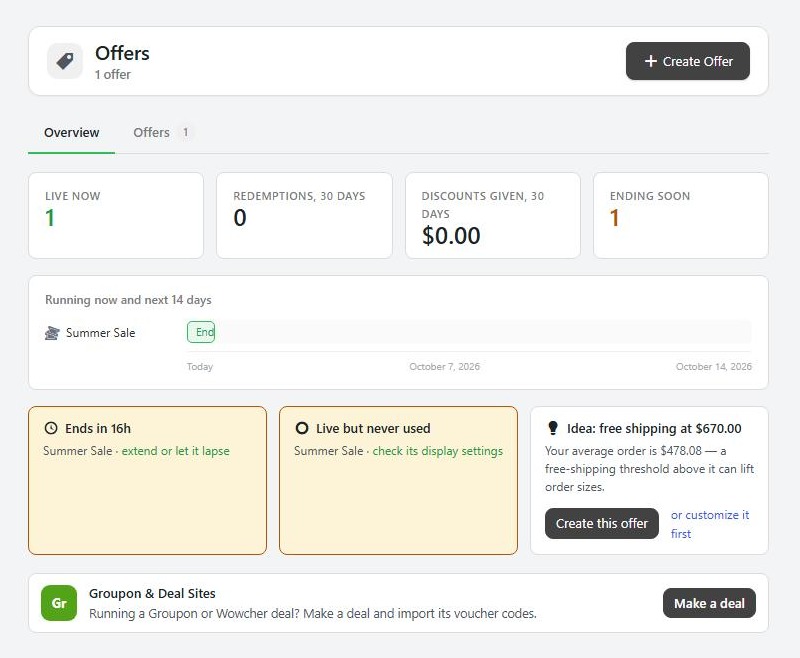
Build every offer a few days early, then let the calendar run it. In the create panel set Starts and Ends, and untick Activate immediately to keep it a draft while you test. For an exact minute, open the offer and set the times in its Schedule. When you are happy, set it to Live and save. A live offer with a future start waits for it, and one with an end date stops on its own.
Want a weekend-only flash sale? Pick the days under Only on these days. Running a trade-only deal? Limit the offer to a customer role, such as Wholesale, and its badges show only to those customers.
Check your time zone first
Offers follow your WordPress time zone in Settings › General. A sale set for midnight in the wrong zone starts hours early, which is exactly when the deal sites are watching.
Codes that can't travel.
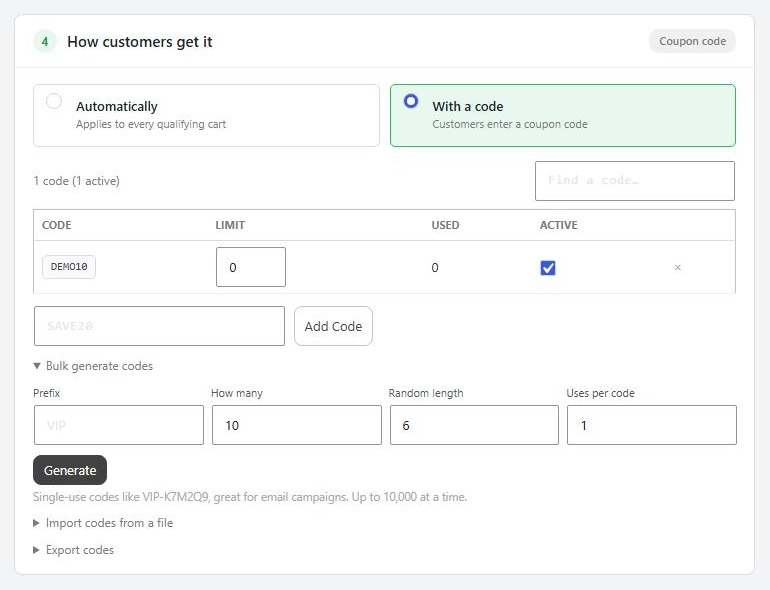
A shared code like BLACKFRIDAY20 is public the moment you send it. For anything private, use codes that work once. In the offer, choose With a code, open Bulk generate codes, and set a Prefix, How many and Uses per code of 1. You get codes like VIP-K7M2Q9, one per subscriber, ready to merge into your email. A code that gets posted online is used once and is done.
- Import codes from a file to load codes from a partner or a printed card, or to switch off codes that were refunded or leaked, in one go.
- Export codes for one row per code, with how often it was used and which orders used it.
- Keep it off the receipt. Settings let you choose whether receipts, invoices, order emails and My Account show the code a customer used, so a private code is never printed for someone to share.
And if a shopper types a code the cart refuses, nothing comes off the order. No half-applied discounts.
Limits. Caps. No stacking.
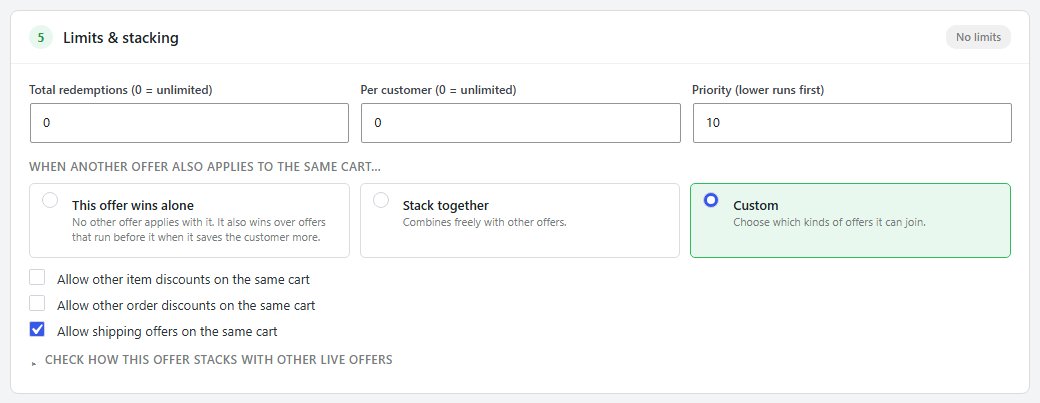
This is where most Black Friday margin is lost, and where a few numbers protect it. In Limits & stacking:
- Total redemptions. Run a “first 100 orders” deal that really stops at 100.
- Per customer. Set it to 1 and a deal is one per customer, not one per checkout.
- When another offer also applies. Choose This offer wins alone so nothing combines with it, Stack together to combine freely, or Custom to allow only, say, free shipping on top.
Then press Check how this offer stacks with other live offers and read every verdict. It reads your saved settings, so save first.
For the hard ceiling, open Advanced discount behavior under the deal:
- Cap the total discount at sets the most any one order can receive.
- Apply at most limits how many times a BOGO repeats in one order.
- Also apply to items already on sale decides, on purpose, whether clearance items get a second discount.
- Discount is based on the regular price or the current price after sales.
The rule of thumb
A storewide percent off that stacks with a code and applies to sale items can take a cart below cost. Give your biggest offer “wins alone”, cap it, and leave sale items out.
Sell it in the store.
An offer nobody sees does not sell. In How it looks in the store each automatic offer promotes itself:
- A badge on product images, such as 30% OFF, in your colour and shape.
- A product page callout, one line on qualifying products: “Buy 2, get 1 free this week!”
- A countdown when the offer is ending soon. Real urgency, because the end date is real.
- Progress messaging in the cart: “Spend $12 more…” for free shipping. It is the most effective line on the page.
Need a link for an email or a post? A cart link drops the products, and the code, straight into the cart.
Test it before they do.
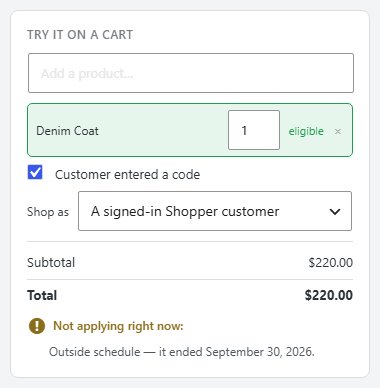
Every offer has a plain-English summary and a tester on the right of the editor. This offer, in plain English says what it does in a sentence. Try it on a cart lets you add products, tick Customer entered a code, and Shop as a guest or a signed-in customer. It shows the total, or the reason the offer is not applying right now, such as “Outside schedule”.
Then try it for real: a cart just under and just over your free-shipping threshold, a code used twice by the same customer, and two offers in one cart. If anything surprises you, it surprised you on Tuesday, not on Black Friday.
Know which deal paid.
Each offer has a Performance panel: redemptions by day, the discount given, the revenue it brought in, and the average order with the offer next to your store’s average. If the offer’s average order is lower than the store’s, it is giving money away, not pulling carts up.
- The Offers overview shows what is live, redemptions and discounts over 30 days, what ends soon, and any offer that is live but never used.
- The product’s Offers tab shows every offer touching that product, with its uses, orders and revenue.
- EasyCart › Reports has a codes report, and order exports list the codes and promotions on every order.
Write down what worked. That is next year’s plan, already half built. Every setting is in the coupons and automatic discounts guide, and the full week-by-week plan is in How to Plan a Black Friday Promotion.
Beyond the settings screen.
- Know your floor. Work out each best seller’s cost, shipping included, before you pick a percentage. The discount comes out of margin, not price.
- Reward your list first. Send subscribers their single-use codes a day early. Early access costs nothing and builds loyalty.
- Check stock. A deal on something you cannot ship is a refund and a bad review. Restock or leave it out.
- Post an order-by date. Tell customers the last day to order for holiday delivery.
- Plan January. Black Friday customers are new customers. Follow up with a thank-you, not another discount.
Stuck on an offer that will not apply, or one that applies too much? Open a request in your account and name the offer and the cart.
★★★★★ Rated 4.5 out of 5 by 200+ store owners on wordpress.org
“To do what EasyCart allows me to do required me to install literally at least a dozen plugins.”
— fprus, wordpress.org review, July 2022
WordPress ecommerce
A sale you control.
Scheduled offers, single-use codes, per-customer limits, stacking rules, badges, countdowns and results per offer are all part of WP EasyCart PRO, from $119 a year or $14.99 a month. Start a free trial and build your Black Friday sale on your own store this week.