
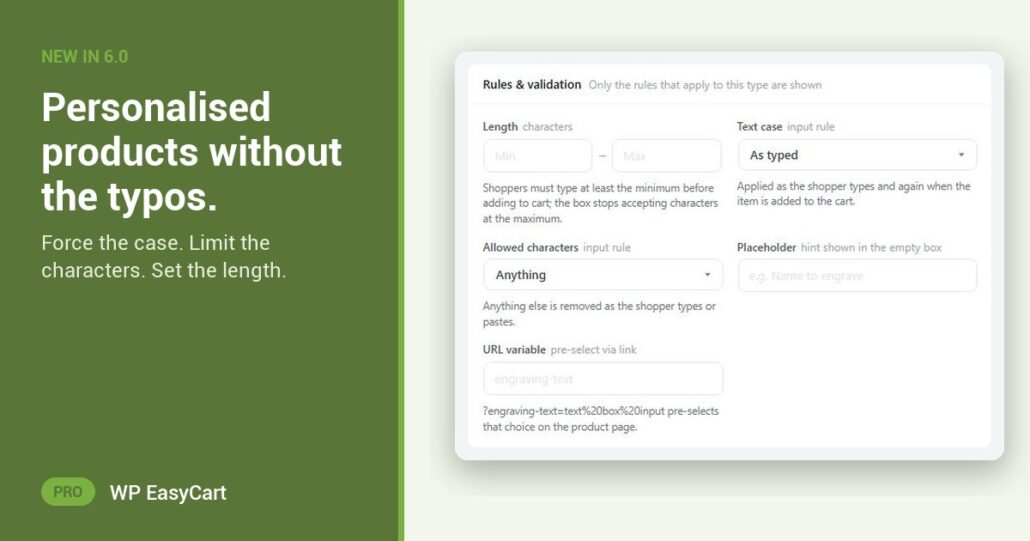
The mug says “sarah”. The customer wanted “SARAH”. You engraved what they typed, and now you are making it twice.
In WP EasyCart 6.0 and later, a text option carries its own rules. Add a Text input or Text area modifier to a product for the name, the monogram or the message, then open the set and look under Rules & validation.
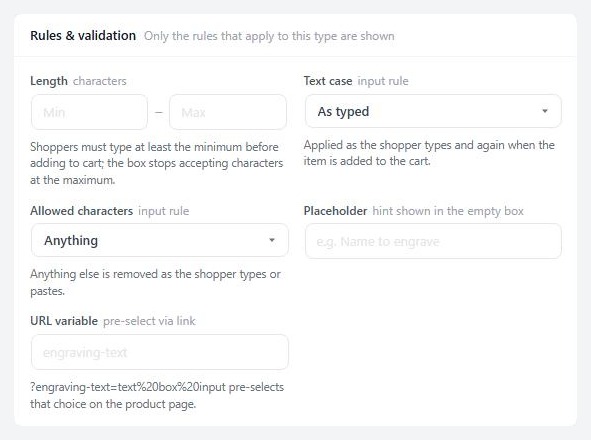
Right case. Right characters. Right length.
Text case turns whatever the shopper types into UPPERCASE, lowercase or Title Case. Monograms come out in capitals every time, without an email to check.
Allowed characters keeps the text to letters, letters and spaces, numbers, or letters and numbers. No emoji on a ring. No symbols your engraver cannot cut.
Set the length to match the space on the product. Too short and the shopper reads “Please enter at least N characters.” A Placeholder shows them what you expect before they type a thing.
The rules apply as the customer types, and again when the item goes to the cart, so nothing slips past the form. Make the field required, write your own error message, and charge per character if longer text costs you more.
It is part of one system. Options, variations, stock, payments and shipping sit in the same plugin, so the personalisation shows in the cart, at checkout, in the order email and on the invoice. No product add-ons plugin to bolt on.
Where: WP Admin › EasyCart › Products › Option Sets › open a text set › Rules & validation. Plan: PRO or Premium. See every product design feature, or read the options how-to guide.
WP EasyCart PRO
Get the name right the first time.
Options, stock, payments and shipping in one plugin, no add-on stack. The free trial unlocks PRO on your own site. Rated 4.5 out of 5 by 200+ store owners on wordpress.org.