

A customer pays. Then they wait for the receipt. It never comes, because it is sitting in their spam folder, or it was dropped on the way. Now they are not sure the order went through. Some email you. Some call their bank. A few never buy again.
Email is the quiet half of every sale. The receipt, the shipped notice, the password reset. When it works, nobody notices. When it does not, it costs you trust, repeat sales and hours of support. The good news: the fix is usually ten minutes of setup, and WP EasyCart now does most of the checking for you.
Missing emails. Lost trust.
For a small store, the receipt is part of the product. It is proof the order is real, a record for the customer’s accounts and the first step back to your store. The shipped email with tracking heads off the “where is my order?” message before it is written.
When those emails go missing, the cost spreads out. Customers lose confidence and ask for refunds. Your inbox fills with questions you already answered. Password resets fail, so returning customers give up at login. And because nothing visibly breaks, it can go on for weeks before anyone notices.
That is why store email is the first thing we suggest checking in any new store, and why WP EasyCart 6.0 put a full deliverability toolkit on one screen. It is free, in every edition.
Why it happens. Plainly.
Out of the box, WordPress sends email straight from your web server. Inboxes are wary of that, and with good reason. Spammers send from web servers too. Nothing on a basic server proves it is allowed to send mail for your domain, so Gmail, Outlook and Yahoo treat it as a stranger.
Three things usually go wrong together:
- The wrong sender. Mail that claims to come from a Gmail, Yahoo or Outlook address, but is sent by your server, looks forged. Those providers reject it or send it to spam.
- The wrong route. Your web server is not a mail server. A proper sending service, connected through a mail plugin, delivers far better.
- No proof of identity. Three short DNS records, called SPF, DKIM and DMARC, tell inboxes the mail really is yours. Without them, you are asking to be trusted on your word.
Fix those three and most stores go from spam to inbox. Here is how, step by step.
Check first. Then fix.
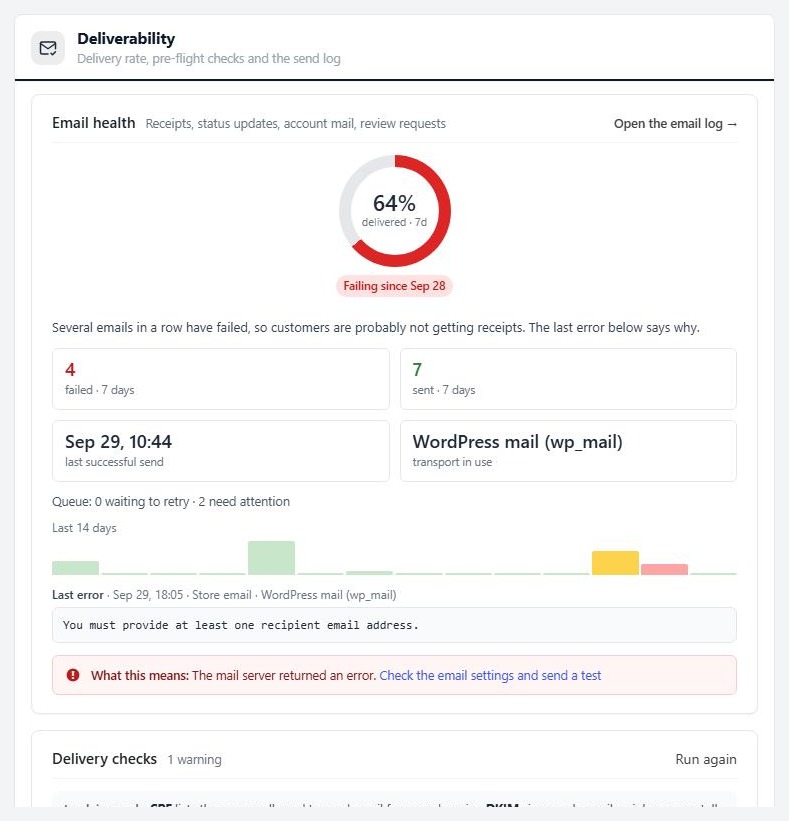
Open EasyCart › Settings › Email. The Deliverability section sits at the top, and it starts with the Email health card. It reads the last seven days of mail:
- A delivery ring. The share of emails your mail server accepted. 98 per cent or more reads Healthy. Below that it says Some failures, or Failing since a date.
- The numbers that matter. Failed and sent in seven days, the last successful send, and how mail leaves the site.
- The last error, in plain words. What the mail server said, what it means, and what to do about it.
If three emails fail in a row, a red Store emails are failing banner appears across the WP EasyCart admin, with Fix email and See affected orders buttons. You hear about the problem in minutes, not from an angry customer. More on the Email health card.
Ten minutes. Four steps.
The rest of the screen walks you through the fix. Here it is in order.
1. Set your sender
Still on Settings › Email, fill in three addresses. All of them ship with placeholders:
- Store notification addresses (Sender section): where your own copy of every order goes. Use an inbox someone reads.
- Order emails come from (Order emails section): the sender on receipts. Write it as
Your Store <orders@yourdomain.com>so customers see your name. - Account emails come from (Account emails section): the sender on password resets. People reply to these, so use an inbox you watch.
Use an address on your own domain, never a free Gmail or Yahoo mailbox. Leave Send method on WordPress mail. It is the default, and it lets a mail plugin take over delivery.
2. Send through a mail plugin
Install one free mail plugin, such as WP Mail SMTP or FluentSMTP, and connect it to a sending account: Google Workspace, Microsoft 365, Amazon SES, SendGrid, Brevo, Mailgun and the like. If your store still sends through the server, WP EasyCart shows an Improve delivery in 3 steps guide to walk you through it.
3. Add SPF, DKIM and DMARC
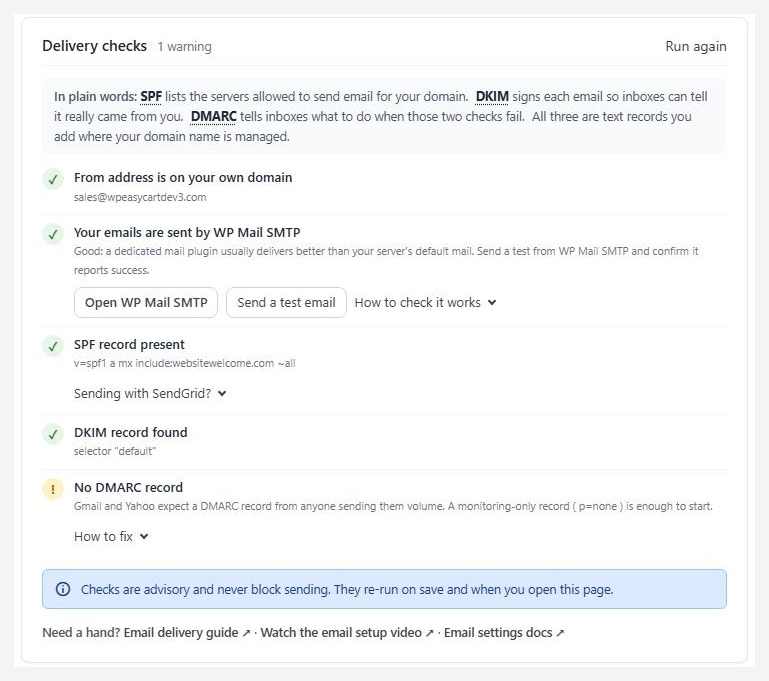
The Delivery checks card looks up your domain and tells you what is there and what is missing. In plain words:
- SPF lists the servers allowed to send email for your domain.
- DKIM signs each email so inboxes can tell it really came from you.
- DMARC tells inboxes what to do when those two checks fail.
Open How to fix on any warning. WP EasyCart builds the record for you, with a Copy button for the type, the host and the value. For SPF it spots your sending service and merges it into the record you already have, because a domain may only have one. For DMARC it starts you on a safe, monitoring-only record. DKIM keys are unique to your provider, so it tells you where to fetch yours. It even names your DNS host, Cloudflare, GoDaddy, Namecheap and others, and where to click.
New records usually appear within an hour. Then press Run again. The checks are advisory, so they never block a sale while you work.
4. Send a test
Use Send a test email from the Deliverability panel, or Send a test order email in the Order emails section. The test takes the same route as a real receipt and shows up in the log. Check the inbox and the spam folder. Then place a real test order and send the receipt to a Gmail and an Outlook address.
Sent is not the same as delivered
The health card shows that your mail server accepted an email. Whether the inbox trusts it is down to your sender, your mail plugin and those three DNS records. Do all four steps, not just one.
Failed once. Sent anyway.
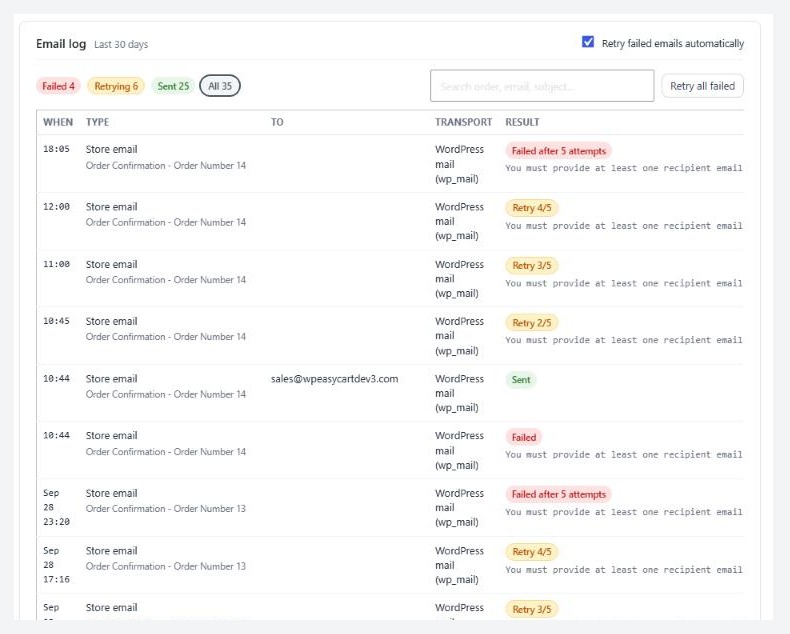
Even a good setup has a bad minute. A password changes, a provider hiccups. In WP EasyCart, a failed email is not a lost email.
- The retry queue. With Retry failed emails automatically on, which is the default, a failed email tries again after 1 minute, 10 minutes and an hour, then every 6 hours, up to five attempts. Press Send queue now to run it at once.
- The email log. Thirty days of sends: when, what, who, how and the result. Filter by Failed, Retrying or Sent, or search by order number or address. It stores no email bodies.
- One-click repair. Fixed the cause? Press Retry all failed and the stuck emails go out.
- A safe drill. Simulate a failed send shows a retry in action without sending anything to anyone.
See the email log and retry queue in action, or read every option in Email Settings.
Good habits. Full inboxes.
The plugin covers the setup. These habits keep your mail landing:
- Keep store mail and marketing apart. Send newsletters from a marketing service, not your store. A spam complaint about a promotion should never hurt your receipts.
- Use an app password. If your provider offers them, use one in your mail plugin. A changed account password then cannot quietly break every receipt.
- Ask new customers to add you. A line on the order confirmation page, “add orders@yourdomain.com to your contacts”, helps the first email land.
- Write like a person. Clear subject lines, your store name in the sender, no all-caps. Spam filters read your words as well as your records.
- Look once a week. A green ring takes two seconds to check. It is the cheapest insurance your store has.
Want the full walkthrough, with every symptom and its fix? Read How to Fix Order Emails Going to Spam or Missing and How to Set Up Order Emails and Documents. Still stuck? Open a request in your account and paste the Last error from the health card.
★★★★★ Rated 4.5 out of 5 by 200+ store owners on wordpress.org
“All over the settings of this plug-in you can see and feel all the time and attention that’s gone into this app!”
— actual_size, wordpress.org review, February 2023
WordPress ecommerce
Receipts that arrive. Every time.
Email health, delivery checks, ready-to-copy DNS records, the email log and automatic retries are free in WP EasyCart. Start a free trial to try PRO on your own store too.