

Nobody opens an online store to babysit it. You want it fast for shoppers, steady for you, and closed to the people trying to take advantage of it. When it works, you never think about it. When it does not, you think about nothing else.
WP EasyCart 6.0 spent a lot of its effort on exactly that. Not shiny new screens, but the quiet work underneath: quicker shipping quotes, a way back from a wrong click, a record of every stock change, files that stay paid for, and forms that spammers cannot flood. Here is what changed, and how to use it.
Reliable stores. Sell more.
Small stores win on trust. A shopper who waits too long at checkout leaves. A customer who gets the wrong stock count, or an order that vanished, does not come back. And every hour you spend fixing a mistake, deleting spam or chasing a missing file is an hour you are not selling.
Those problems rarely come from one big failure. They come from small leaks. A slow carrier that holds up every cart. One mis-click on Delete. A download link passed around a forum. A form bot sending 300 “inquiries” overnight. Plug the leaks and the store gets faster, calmer and cheaper to run.
That is the idea behind this round of changes. Most of it is free in every WP EasyCart store. Two parts, live carrier rates and stock history, come with PRO. We will say which is which as we go.
Quick quotes. No waiting.
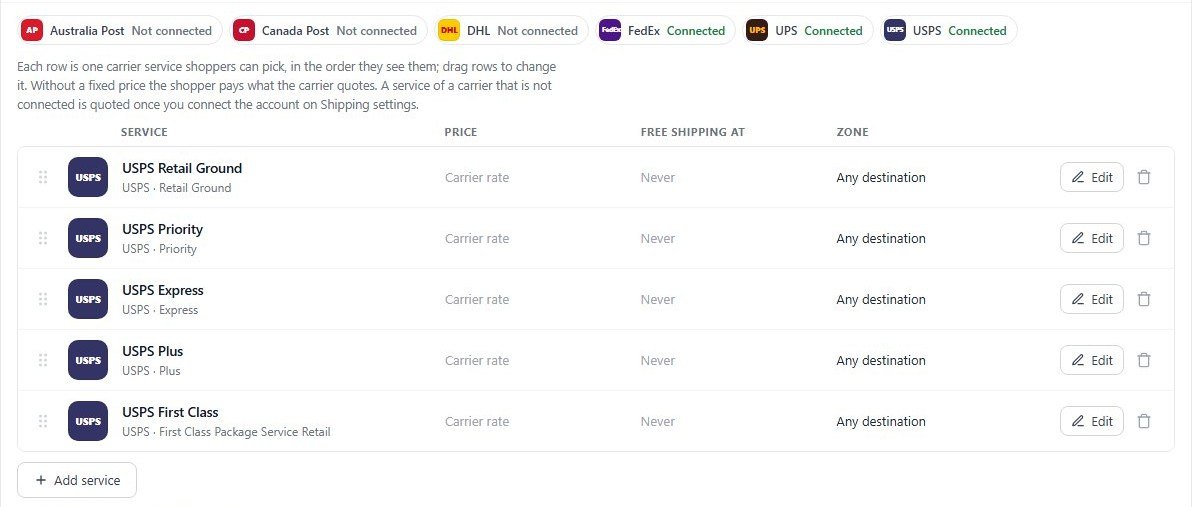
Live carrier rates show shoppers the real price from Canada Post, FedEx, UPS or USPS. They are accurate, but every quote is a trip to the carrier and back. Before 6.0, the store asked each carrier in turn. With three carriers on, the shopper waited for all three, added together, every time the cart changed.
Now the carriers are asked at the same time. A cart update waits for the slowest carrier, not the total. Then the safety nets:
- Time limits on every request. Five seconds to connect and ten seconds overall. Canada Post and USPS had no limit before, so one slow reply could hang the cart.
- A five-minute pause for a failing carrier. If a carrier cannot be reached, rejects your account or has a server error, it is skipped for five minutes instead of slowing every cart change.
- An easy way back. Saving that carrier’s settings, reconnecting UPS or a passing connection test lifts the pause. Each pause is written to the logs, so you can see what happened.
In 6.0.1, parcels are also measured correctly, so USPS, UPS, FedEx and DHL quotes land much closer to what you really pay. Live carrier rates are PRO. Read the Shipping Rates guide, or set up shipping that does not lose money.
Wrong click? Undo.
Everyone has deleted the wrong thing. On most stores, that means a backup restore, a support ticket, or retyping an order from memory. In WP EasyCart 6.0.1 and later, a deleted order, product or customer can be put back for 15 minutes.
- Delete as usual from the Orders, Products or Customers list.
- A bar appears at the top of the list: Action completed. Undo available.
- Press Undo. The records come back exactly as they were, with the same ids, so links and reports still match.
The same undo covers subscribers, roles, subscription plans and subscriptions. And deleting a customer now asks what to do with their orders: move them to another customer, or keep them as guest orders. Your sales history stays whole. Undo is free. See Order Management and the Products list.
Give staff the right access
Undo is a safety net, not a plan. If someone only packs orders, they do not need to delete products. Fewer people with Delete means fewer things to undo.
Every unit. Accounted for.
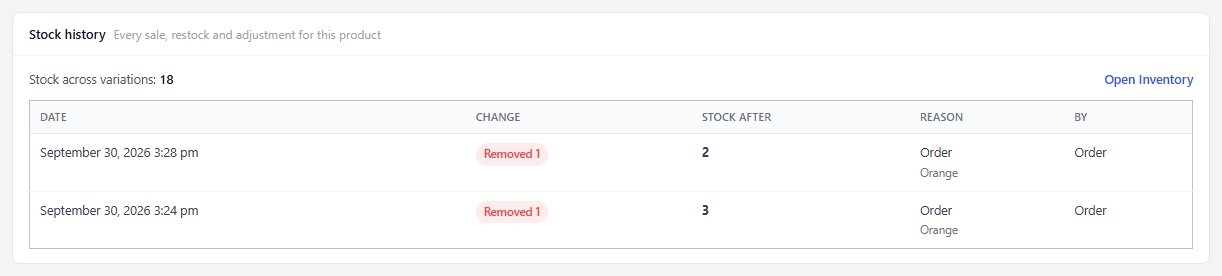
“Where did that stock go?” is one of the most expensive questions in retail. If you cannot answer it, you cannot tell a sale from a mistake, a return from a miscount, or a slow product from a shrinking one.
Stock history answers it. Open any product, go to the Inventory & Shipping tab and the Stock history card lists every sale, restock and adjustment: the date, the change, the stock after it, the reason and who made it. Quantities changed in the product editor are recorded too, and Bulk Update asks for a reason instead of guessing one.
The inventory import was rebuilt alongside it. It previews every row before anything changes, applies the update in the background, logs each change to stock history, and explains any row it cannot match. The export carries Product ID and Variant ID, so variations that share a SKU still update correctly. Stock history is PRO. Read the Inventory & Shipping guide and how to stop overselling.
Paid files. Stay paid.
If you sell downloads, the file is the product. If someone can reach it without paying, so can everyone they share the address with. The same goes the other way: files your customers upload, like artwork for a custom print, are private and should stay that way.
- Paid downloads need a paid order. A download file can no longer be fetched by its direct address without buying it.
- Customer uploads are private. Files from the file upload option can no longer be downloaded by guessing their address. Staff get a secure link in the admin order email and on the order screen, and it only opens for a signed-in administrator or order manager.
- Missing files say so. If an uploaded file never reached the server, the order shows “File not received” instead of a broken link.
- Repair tools. Manage Downloads explains folder and permission problems and can create a folder, replace a file, choose an existing file or switch to Amazon S3.
All of this is free. See how to sell downloads, or put large files on Amazon S3.
Real inquiries. Zero spam.
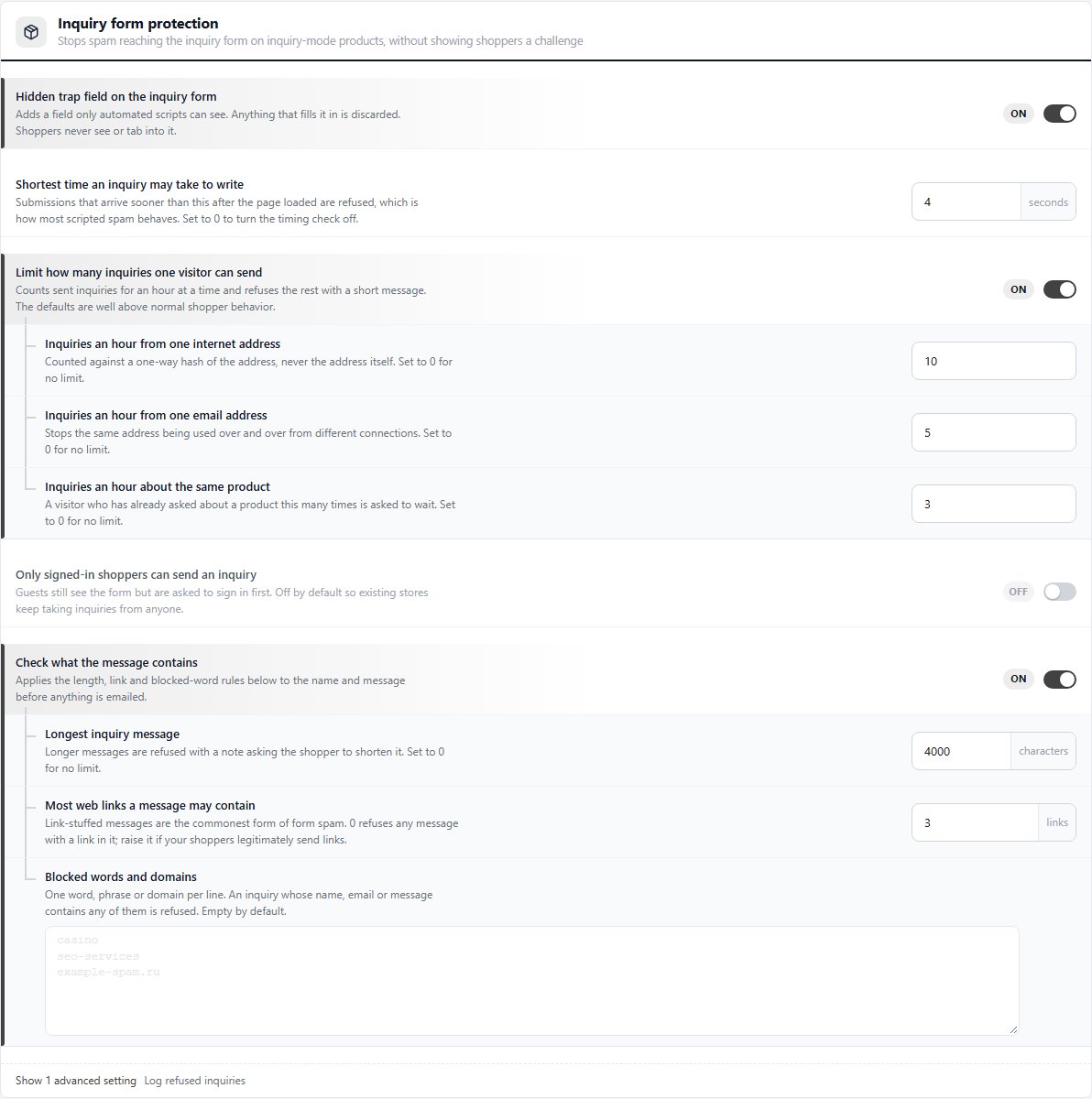
Inquiry forms are great for quotes, custom work and big-ticket items. They are also a magnet for bots. A flooded inbox buries the one real buyer who asked a question. WP EasyCart now stops scripted spam before it is emailed, without making shoppers solve a puzzle.
- A hidden trap field. Only scripts can see it. Anything that fills it in is thrown away.
- A time check. Forms sent faster than a person could type are refused.
- Hourly limits. Per visitor, per email address and per product, all set by you.
- Message rules. Limits on length and links, plus your own list of blocked words and domains.
- Signed-in only, if you want it. Off by default, so existing stores keep taking inquiries.
- A record of what was refused. Refused inquiries go to Log entries with the reason and a masked email address, with no IP address stored.
Find it under Settings › Products › Inquiry form protection. The defaults sit well above normal shopper behaviour, so most stores can leave them alone. It is free. See how to sell by quote and read about Log entries.
Updates that finish.
An update should be the most boring part of running a store. Two fixes in 6.0.1 make sure it is. Database updates no longer get stuck on “database upgrade in progress”. And if your host refuses one database change, you can skip that single step from Store Status so the rest of the update finishes, instead of leaving the whole store half-updated. 6.0.2 also fixed installs and updates on MySQL 8 and MySQL 5.5 servers that could not complete before.
Free, and automatic. Read the Store Status guide and how to upgrade the plugin.
Good habits. Fewer fires.
The plugin handles a lot. These habits cover the rest:
- Back up before you update. A nightly backup from your host plus one before each big update. Undo covers a wrong click; backups cover everything else.
- Keep carriers lean. Offer the two or three services shoppers actually choose. Fewer services mean faster quotes and a cleaner checkout.
- Count, then compare. Do a quick stock count on your best sellers each month and check it against stock history. Gaps show up early, while they are small.
- Check the logs once a week. Paused carriers and refused inquiries both land in Log entries. Two minutes there tells you if something needs attention.
- Keep WordPress current. WordPress, your theme and your plugins all need updates. Most break-ins start with something left out of date.
Want the full picture? See WP EasyCart shipping features and inventory features for WordPress ecommerce, or browse every feature. Questions? Our team is available through your account.
★★★★★ Rated 4.5 out of 5 by 200+ store owners on wordpress.org
“I have used this on multiple sites, and it’s been rock solid for all my customer’s needs.”
— wpgcueball, wordpress.org review, May 2024
Faster. Safer. Yours.
Undo, locked-down files and inquiry spam protection are free in WP EasyCart. The free trial unlocks PRO on your own store, so you can try live carrier rates and stock history before you decide.