

A sale comes in. Then the copying starts. The order goes into a spreadsheet. The team hears about it in a chat. The customer goes into your email list and your CRM. Later, a tracking number comes back from the warehouse and somebody pastes it into the order.
None of that is selling. The new Zapier extension for WP EasyCart Premium does it for you. Your store talks to the more than 9,000 apps on Zapier, with no code and no WordPress password handed to anyone.
Less copying. More selling.
Every growing store ends up with a stack of tools. A spreadsheet for the numbers. A chat app for the team. An email service, a CRM, a project board, a warehouse. Each one is useful. Keeping them all in step by hand is not.
At ten orders a week, the copying is a chore. At a hundred, it is somebody’s job. And it goes wrong. A missed order never reaches the workshop. A new customer never reaches the mailing list. A tracking number sits in an email instead of on the order, and the customer writes in to ask where their parcel is.
Zapier fixes that. You build a Zap: when this happens in one app, do that in another. Set it up once and it runs on every order, day and night. Your tools stay in step, your team hears about sales as they happen, and you get your evenings back.
Your store. Starting Zaps.
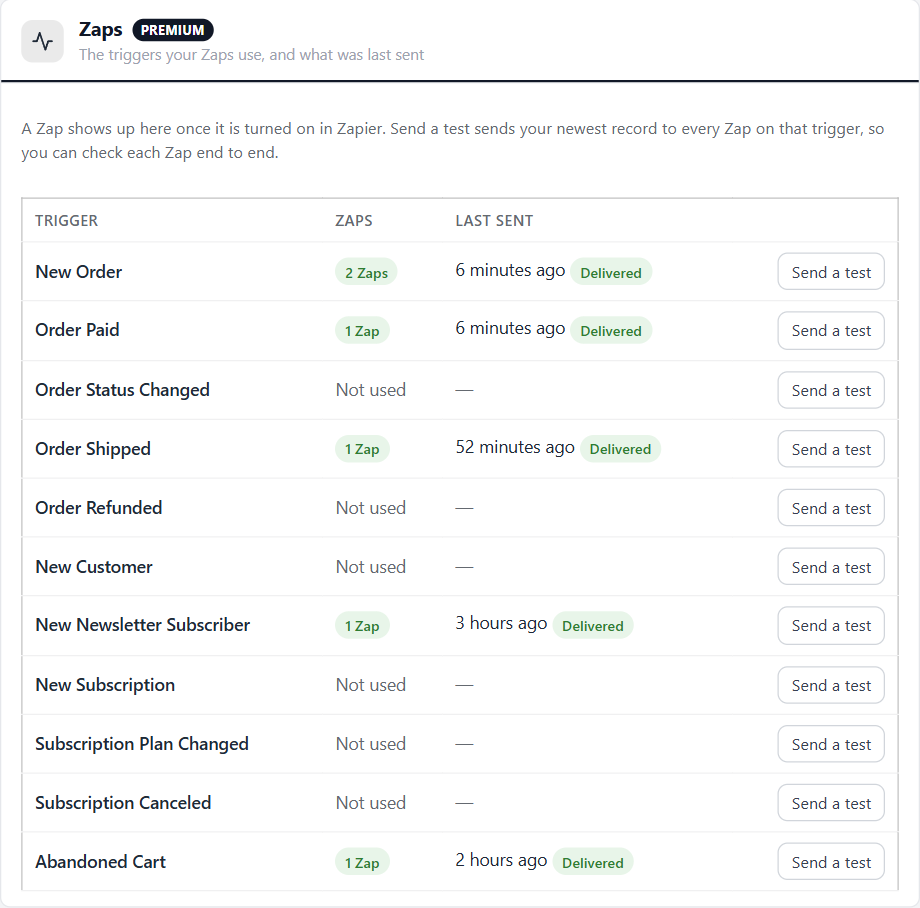
Eleven things that happen in your store can start a Zap:
- Orders. New Order, Order Paid, Order Status Changed ( for every status, or just the one you pick ), Order Shipped with the carrier and tracking link, and Order Refunded with the amount.
- People. New Customer and New Newsletter Subscriber.
- Subscriptions. New Subscription, Subscription Plan Changed ( with the plan they were on before ) and Subscription Canceled.
- Abandoned carts. A shopper who typed their email address left items behind. The record includes a link that brings the cart back.
Each order arrives with everything on it: the customer, both addresses, every line with its SKU and options, the shipping method, the tax, the coupon codes and the total. Plenty to fill a spreadsheet row or a CRM record.
Other apps. Updating your store.
It works the other way too. A Zap can change things in your store:
- Update Order Status. Move an order on, with the receipt or shipped email when you want it.
- Add Shipment Tracking. Add the tracking number, mark the order shipped and send the shipped email with the tracking link.
- Create or Update Customer. Bring in customers from a form, an event list or another shop.
- Add Newsletter Subscriber. Grow your store’s own list from anywhere people sign up.
- Update Product Stock. Set stock, add to it or take from it, by option combination too.
Three searches let a Zap look something up on the way: Find Order by number or email, Find Customer ( or create one ) and Find Product by SKU or title.
Five Zaps. Worth making today.
Not sure where to start? These use only the triggers and actions above.
- Every order in a spreadsheet. New Order → add a row in Google Sheets. A live sales log your accountant or partner can open any time.
- Tell the team. Order Paid → post a message in Slack with the order number, total and items. Nobody refreshes the orders screen to see if the day is going well.
- One mailing list. New Newsletter Subscriber → add them in Mailchimp. People who sign up in your store land in the list you actually send from.
- A card for every job. New Order → make a card in Trello. Perfect for made-to-order, print or custom work, where each order is a job to track.
- Tracking without the pasting. A new row in a shipping spreadsheet → Find Order, then Add Shipment Tracking. The order is marked shipped and the customer gets the tracking link.
Those are starting points. Swap Google Sheets for Airtable, Slack for Microsoft Teams or a text message, Mailchimp for your email tool. If an app is on Zapier, your store can reach it.
Already sending abandoned cart emails?
WP EasyCart PRO has its own abandoned cart emails. If they are on, use the Abandoned Cart trigger for something else, like a note to your sales team or a row in your CRM, so shoppers do not get two reminders.
Four steps. One coffee.
Everything lives on one screen: EasyCart › Extensions › Zapier.
- Install it. On EasyCart › Extensions, install Zapier. It comes with your Premium plan.
- Get access. WP EasyCart is in early access on Zapier, so it is not in Zapier’s app directory yet. Press Accept the Zapier invite in Get started, or email sales@wpeasycart.com with your store address and your Zapier email for an invite.
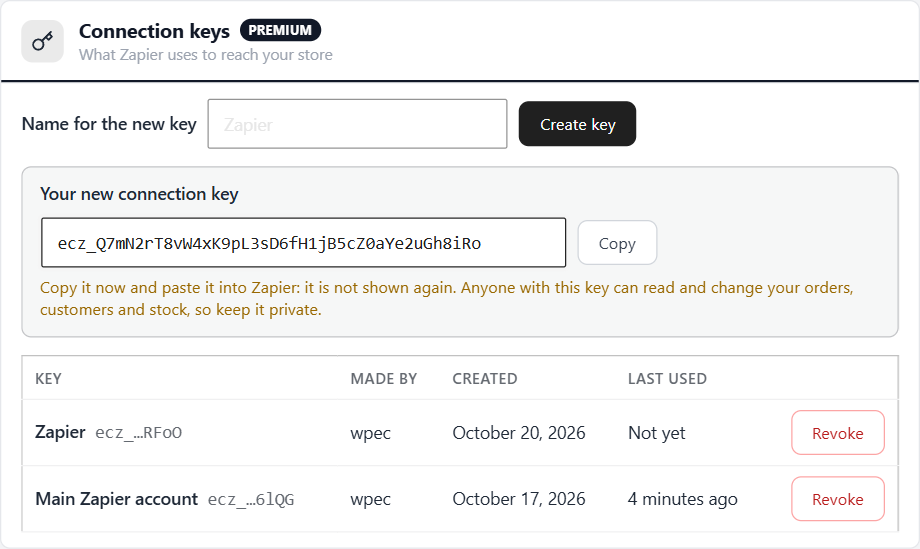
- Create a key. Under Connection keys, name a key and press Create key. Copy it straight away: it is shown once.
- Make a Zap. In Zapier, choose WP EasyCart, enter your store address and the key, then pick a trigger or an action.
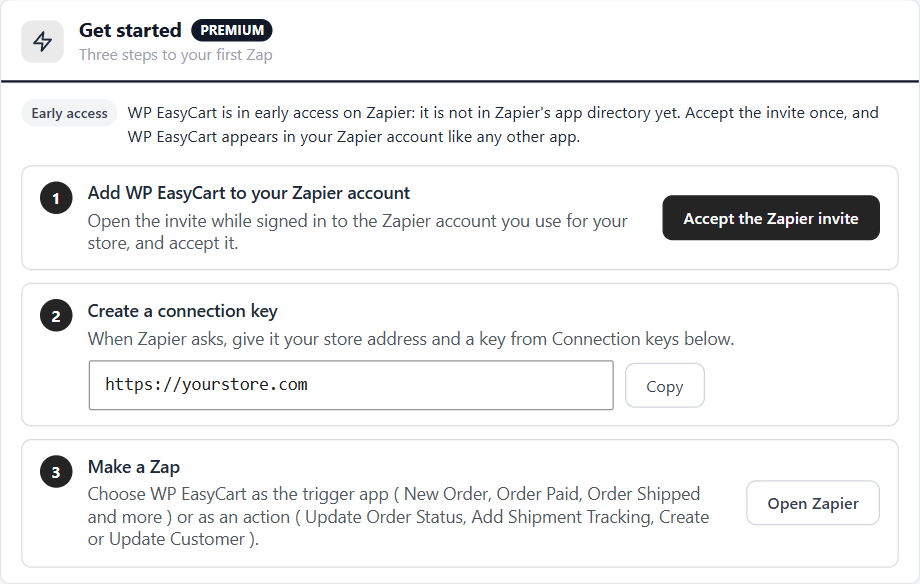
Accept the invite while signed in to the Zapier account your Zaps will live in. Once Zapier lists WP EasyCart in its directory, no invite is needed, and Zaps made during early access keep working.
Keys, not passwords.
Many WordPress connections ask for an admin password. This one never does. Zapier signs in with a connection key you make in the store, and the store keeps only a scrambled copy of it.
- One key per person. Make a key for each Zapier account or team member. Each shows who made it and when Zapier last used it.
- Revoke in one click. Revoking a key stops only the Zaps connected with it. The rest keep running.
- Only to Zapier. Your store sends only to Zapier’s own hook addresses. Records never include card numbers, passwords, admin notes or the private order links in your customers’ emails.
Checkout never waits.
Zaps should never cost you a sale. So the store sends to Zapier after the page has gone to the shopper. A slow or unreachable Zapier never slows a checkout.
If Zapier cannot be reached, the store tries again after 1 minute, 10 minutes, 1 hour, 6 hours and 1 day. The Zaps section shows each trigger in use and whether its last send was Delivered or is still retrying. Delete a Zap in Zapier and the store stops sending to it on its own.
Good to know. Before you start.
- Zapier plan. A Zap with one trigger and one action works on every Zapier plan. A Zap with a search needs three steps, so check your plan allows that.
- A public HTTPS store. Zapier cannot reach a site on your own computer or a private network.
- New records only. Turning on a Zap does not send your old orders. Zapier’s Test trigger shows your three newest records so you can map the fields.
- Send a test runs for real. It sends your newest real record to every Zap on that trigger, and their actions really happen. Point new Zaps at a test sheet or channel first.
- Coming from version 1? Version 2 connects with a key through the new WP EasyCart app on Zapier, so older Zaps have to be made again.
- If Premium lapses, your Zaps keep running and keys can still be revoked. Making a new key needs a current plan.
Every trigger, action and field is listed in the Zapier guide. Want your orders in your books too? The new QuickBooks Online extension is in Premium as well.
Good Zaps. Simple habits.
- Start with one. Pick the job you copy most often and automate that first. Add the next one next week.
- Name your Zaps clearly. “New order → Sales sheet” beats “My Zap 3” when something needs fixing.
- Use SKUs. Find Product and Update Product Stock match on SKU first, so tidy SKUs make stock Zaps reliable.
- Respect consent. Only add people to a mailing list when they agreed to receive it.
- Check the Zaps section monthly. A trigger stuck on retrying usually means a Zap was switched off or an app needs reconnecting.
Questions about connecting? Our team is available through your account.
★★★★★ Rated 4.5 out of 5 by 200+ store owners on wordpress.org
“This one does it all. Haven’t found a thing we couldn’t easily get done, displayed the way we wanted.”
— tasmaniandevil, wordpress.org review, April 2021
New in WP EasyCart Premium
Your store, connected to 9,000+ apps.
Zapier comes with WP EasyCart Premium, with every Premium extension and the store apps: $179 a year or $22.99 a month with AutoPay, cancel any time. Long-time customers qualify for a discount on their first AutoPay year in My Account.