
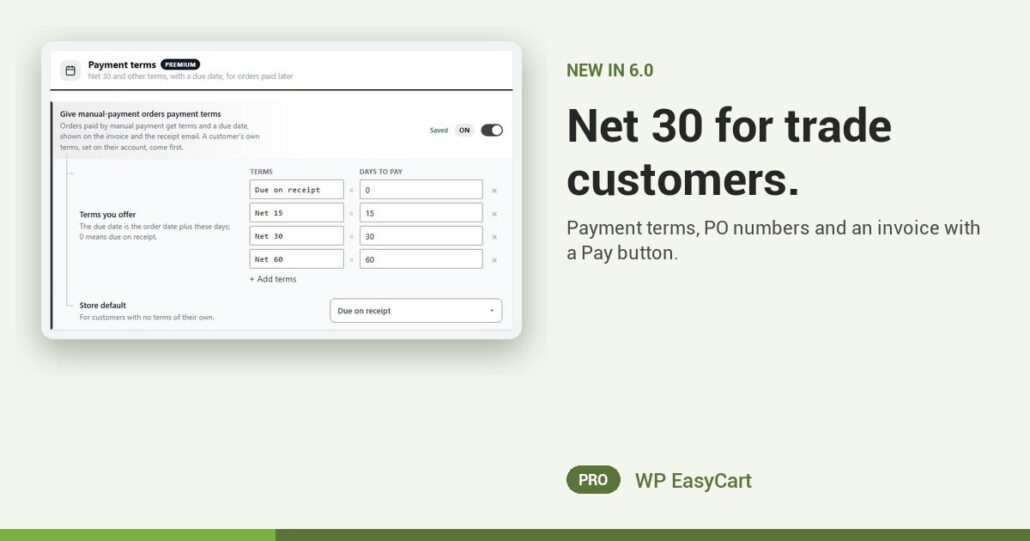
Your wholesale buyers don’t pay by card at checkout. They want terms, their PO number on the invoice, and thirty days. Until now that meant spreadsheets and chasing.
WP EasyCart PRO now runs trade invoicing in the store. Turn on Bill later in Settings › Payment, then switch on Give manual-payment orders payment terms. You get Due on receipt, Net 15, Net 30 and Net 60 out of the box, and Add terms for anything else, like Net 45. Each order gets its due date by itself.
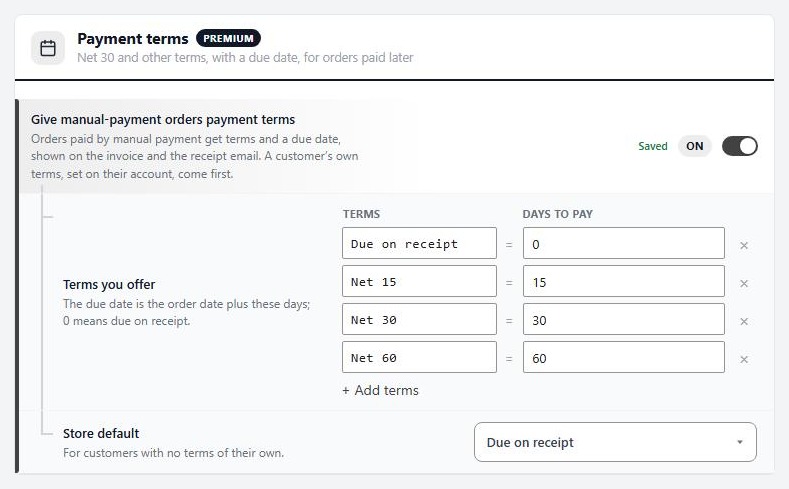
Order now. Invoice today. Paid in 30.
Give one customer their own terms from their account’s Tax & Preferences tab. Turn on Ask for a PO number at checkout, show it only to your wholesale role, and make it required if you never invoice without one. The PO number lands on the invoice and the emails.
Then send the invoice from the order. It carries the PDF, the terms, the due date, the PO number and a Pay button that takes the customer to a pay page for that order, with Stripe, Square or PayPal. When they pay, the order is approved by itself. Late? Filter the orders list by Payment overdue, open the order and press Resend pay link.
Where: WP Admin › EasyCart › Settings › Documents › Payment terms. Plan: PRO or Premium, in WP EasyCart 6.0 or greater. Read the Net 30 invoicing guide and test it end to end.
WP EasyCart PRO
Sell to trade on your terms.
The free trial unlocks PRO on your own site. Set Net 30, place a test trade order and send yourself the invoice. Invoicing, wholesale, payments and shipping in one plugin. Rated 4.5 out of 5 by 200+ store owners on wordpress.org.