
“What size should I order?” “Is there a manual?” “How do I wash it?” Every one of those emails is a shopper who nearly bought and stopped to ask.
The Tabs extension puts the answers on the product page. Open any product and the Product tabs card lists every tab in order. Press Add tab and start blank or from a template: Shipping & returns, Size guide, Warranty, Care instructions or FAQ. Add questions that open one at a time, manuals and spec sheets from your Media Library, or a YouTube video that only loads when the shopper opens the tab.
Write once. Show everywhere. Change anytime.
Your returns policy belongs on every product, not pasted into four hundred of them. Write it once as a shared tab and choose where it shows: All products, chosen categories, chosen manufacturers or chosen products. Edit it once and every product updates. One product needs different words? Use own text changes it there only. Hide here takes it off one product.
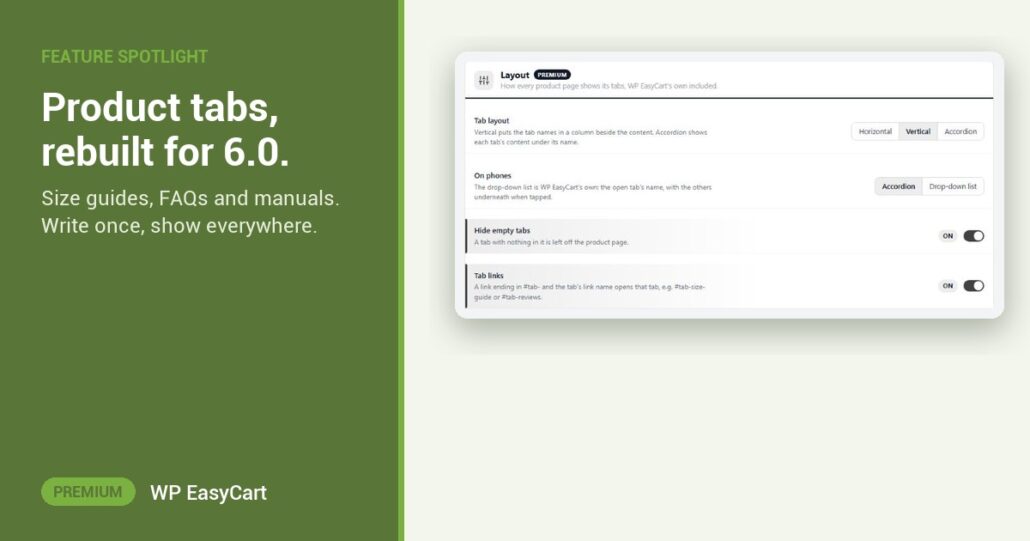
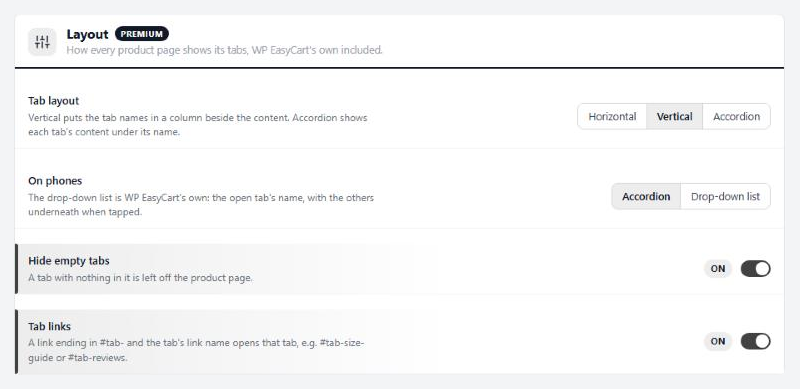
Pick a layout for computers and another for phones. Hide empty tabs keeps blank ones off the page. A link ending in #tab-size-guide opens that tab straight from your description or an email. And if your license ever lapses, your tabs keep showing.
Where: WP Admin › EasyCart › Extensions › Tabs, and the Product tabs card in each product. Plan: Premium, rebuilt for WP EasyCart 6.0 or greater. Read the Tabs guide for every setting.
★★★★★ Rated 4.5 out of 5 by 200+ store owners on wordpress.org
“To do what EasyCart allows me to do required me to install literally at least a dozen plugins.”
— fprus, wordpress.org review, July 2022
WP EasyCart PRO
Answer the question before it is asked.
Premium is PRO plus every Premium extension, Tabs included: payments, shipping, tax and marketing in one plugin. Start with the free trial on your own site. Rated 4.5 out of 5 by 200+ store owners on wordpress.org.